user guide
and dillo
Big Beat Studio BB1, BB1 for short, turns the FM-1 into two drum machines and Dillo, an acid bass synth, playing together through tape echo and spring.
Every button opens one page. The four knobs always do what the bottom of the screen says. HOME brings you back to the selected instrument; hold it and the screen explains every lit key on the page you are on.
A key that is lit does something here; a dark key does nothing.
the unit
An M-VAVE FM-1 with BB1 installed. Chapter 3 shows how to install it.
a computer
Desktop Chrome on a computer, and a USB data cable plugged straight into it. Only the installer needs these.
headphones or speakers
Start with MASTER turned fully down, then bring it up once something plays.
three instruments
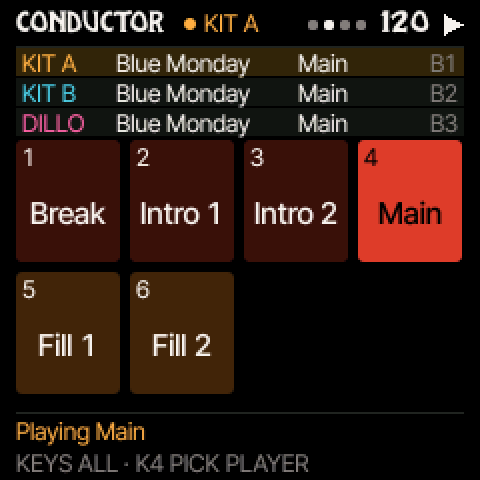
RHYTHM CONDUCTOR plays KIT A, KIT B and Dillo as one band, but still lets one player take a different section.
BIG BEAT is the drum machine: KIT A with an optional KIT B layer. DILLO is the monophonic acid bass, with its own playable screen.
the library
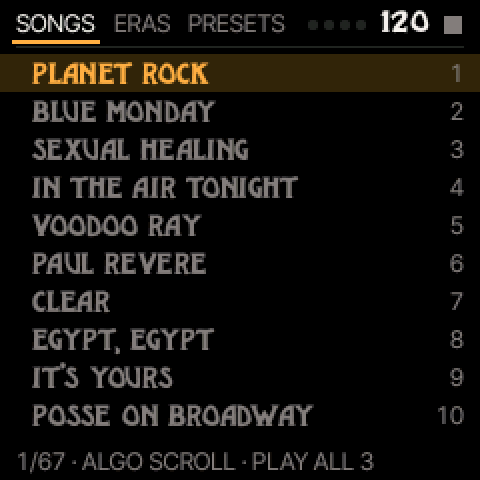
SONGS: 67 named songs. PRESETS: the four Roland rhythm machines, CR-8000, CR-78, TR-66 and TR-77, with 138 rhythms. ERAS: 21 eras with 168 parts. ACID: 27 banks with 205 phrases for Dillo, on Dillo's PATTERN page.
Eight drum machines and four USER kits of your own; nine Dillo sounds.
Chapter 15 lists all of it.
press play
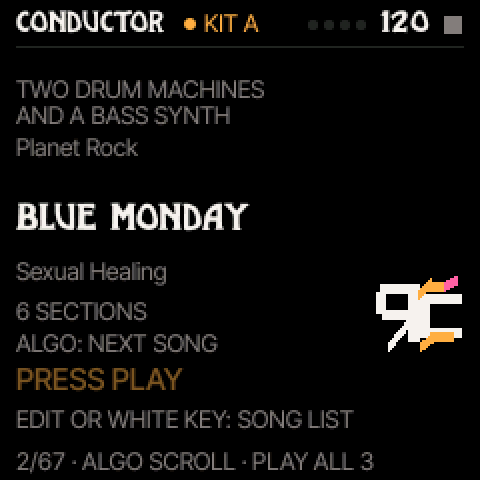
The welcome card offers a song. Turn ALGO for the next song, then press PLAY to start the band and open RHYTHM CONDUCTOR. EDIT or a white key opens the full song list.
If you try Big Beat or Dillo before playing a song, turn SELECT back to Rhythm Conductor to see your selected song again.
get started
In a hurry? Chapter 8 plays a song with the whole band, then builds a beat of your own.
The FM-1 has four large encoders on the left, four knobs and twelve buttons on the right, two octave buttons and a 27-key keyboard.
This guide names every control the way the firmware does.
front panel
| control | what it does |
|---|---|
| MASTER | The volume, for everything. It is the hardware level, not a page. |
| SELECT | On a HOME landing, chooses RHYTHM CONDUCTOR, BIG BEAT or DILLO and changes the screen immediately. Inside an editor it keeps the local player-focus job. Hold REC and turn it to change the tempo. |
| ALGO | Opens PATTERN and moves through eras, songs and, on Dillo, the ACID phrases. On the song list it moves the cursor without leaving it. Hold REC and turn it to queue the next section. |
| PRESETS | Opens KIT and moves through the kits, or Dillo's sounds while the keys keep playing notes. Hold REC and turn it to choose the drum voice. |
| K1-K4 | Four knobs. Their job is printed at the bottom of the screen and changes with the page. |
| HOME | Back to the selected instrument: RHYTHM CONDUCTOR, BIG BEAT or DILLO. Hold it for help. |
| PLAY | Start and stop from the instrument pages. On the song list it loads the selected song on all three players: it starts when stopped and keeps playing when already running. |
| REC | The shift button. Hold it and press or turn a second control (chapter 5). |
| EDIT | Confirms or applies. The screen says what it will do on this page. |
| OCT− OCT+ | Page a list, a step bank, the section keys, an FX tab or the octave, depending on the page. Inside help they turn the help pages. |
| FX SCL ENV LFO GLO SAVE ARP SEQ | Each opens its page or does its one job: chapter 9. |
white and black keys
The 16 white keys are numbered 1 to 16 from the left. The 11 black keys are B1 to B11 from the left.
The keyboard runs from F to G; as notes, the bottom F is MIDI note 41.
usb
USB carries the installer, MIDI in and out, and MIDI clock out.
trs midi in
The TRS input takes MIDI notes and clock, like USB. Choose the clock source on MIDI CLOCK.
BB1 starts on a welcome card, ready to play.
The browser installer lists supported starting versions and links to backup and recovery instructions.
first screen

The welcome card starts with Planet Rock. Turn ALGO to choose a song. EDIT or a white key opens the full list; there ALGO or white keys 1–16 select an entry; B5 B6 B7 switch between SONGS, ERAS and PRESETS. The bottom line says what PLAY will do.
then
Press PLAY: KIT A, KIT B and Dillo load the song together, it starts, and RHYTHM CONDUCTOR shows its sections.
before you click
Use desktop Chrome on a computer and a USB data cable plugged straight in.
Stop playback, turn MASTER fully down and close other music apps.
verify recovery first
Before writing, verify that this FM-1 enters ROM mode and appears over USB as 4C4A:8057. The recovery route must work independently of the installed application.
Make two matching full-flash backups from independent reads and verify a compatible restore path before continuing.
install BB1
Open the installer to install the firmware and its matching sound library.
Keep the FM-1 plugged in and powered on while it is writing.
After updating, check ROM access again and confirm a normal boot.
flash-chip preflight
On a BB1 version that can report it, the installer reads the exact flash-chip ID before sending a sound-library command. It recognises 0x856014 and 0xB36014.
An unverified flash chip stops the sound-library step before any library bytes are written. The firmware update has already finished.
Older BB1 versions may not provide this receipt. RECEIPT UNAVAILABLE is not proof of compatibility: the firmware's own flash allow-list remains the final write gate.
a matched pair
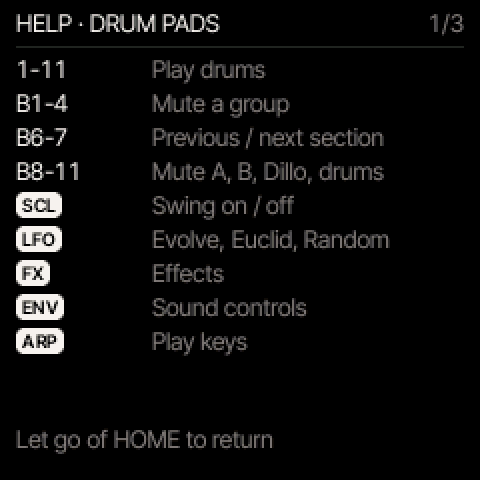
The firmware and its sound library are installed as a pair. The library holds the sampled machines and the help texts.
If the help texts are missing or from another library, help pages read HELP UNAVAILABLE. Every control still works.
Reinstall from the installer page to put the matching library back.
another firmware
The installer can put the official FM-1 firmware back. Keep a backup made with the firmware you plan to return to.
The official firmware cannot open BB1 music: save the projects, scenes and USER-kit information you need first, as the installer page's backup checklist says.
Every page uses the same frame: a status bar on top, the page in the middle, the key map and the four knobs at the bottom.
The screens in this guide are drawn by BB1's own display code.
Most pages share one frame: a status bar on top, the page in the middle, the key map and the four knobs at the bottom. RHYTHM CONDUCTOR and the chooser lists use the whole screen.
play
 12345678910
- 1 page and the control that opens it
- 2 the active instrument or local player, in its colour
- 3 beat dots
- 4 tempo in BPM
- 5 play or stop
- 6 what you are choosing or setting
- 7 grey line: what EDIT does, or the state
- 8 the page itself: steps, lanes or meters
- 9 key map: every key lit as its light is, bright, half-lit, pulsing or off; the key legend shows here for about 2 s
- 10 the four knobs: name and value
perform
123456- 1 RHYTHM CONDUCTOR, the bandleader screen
- 2 the song and section currently playing on each player
- 3 {K1} KIT A, {K2} KIT B and {K3} DILLO are the three mixer levels; {K4} SCOPE chooses ALL, KIT A, KIT B or DILLO. {B1} {B2} {B3} only mute or solo. When a section is queued, every part that will move pulses here.
- 4 one button per section, on white keys {1}–{16}: dark = ready, full colour = playing, pulsing outline = next
- 5 what is playing, or the name of the queued section even after you change pages. ALL NEXT means Kit A, Kit B and Dillo will move together
- 6 the section-key shortcut and how to pick or redirect one player
a chooser list
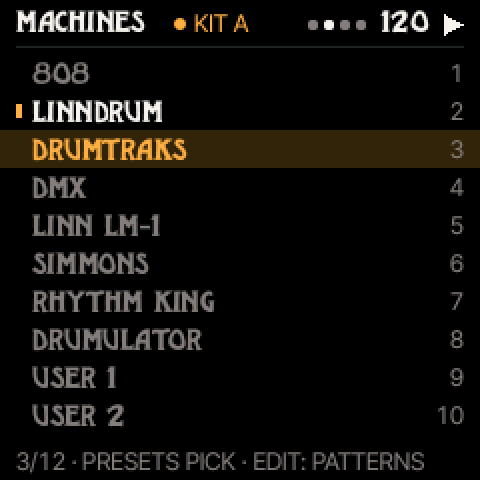 12345
- 1 page and the control that opens it
- 2 ten rows; the highlighted row is the cursor
- 3 the mark: what is playing now
- 4 the white key that picks the row
- 5 which of how many, and what {EDIT} does or what is waiting
knob name and value

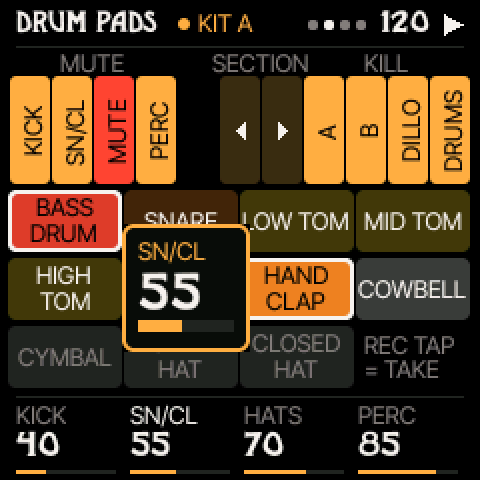
Turn a knob and its name and value show over its column for about a second, on every page.
key legend
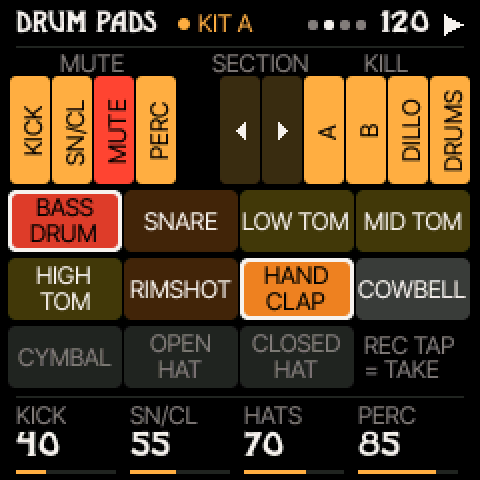
Enter a page, or press a key that has no job there, and a one-line key legend shows for about two seconds. B1–B11 are the black keys.
queued, then applied
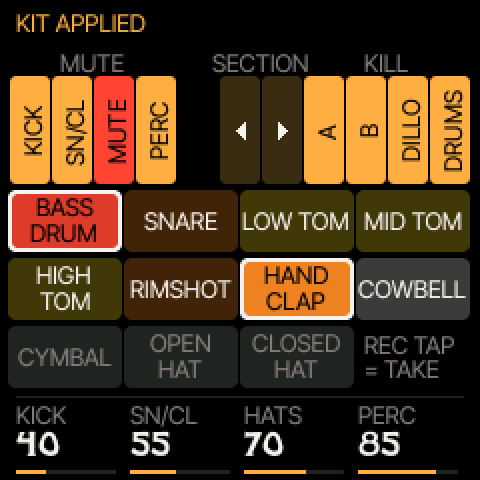
A change waits for the next bar: its key pulses and the screen says QUEUED. When the music has it the key turns bright and the screen says APPLIED. On a playing page, that short message briefly replaces only the top status strip, leaving the instrument controls visible below.
hold home
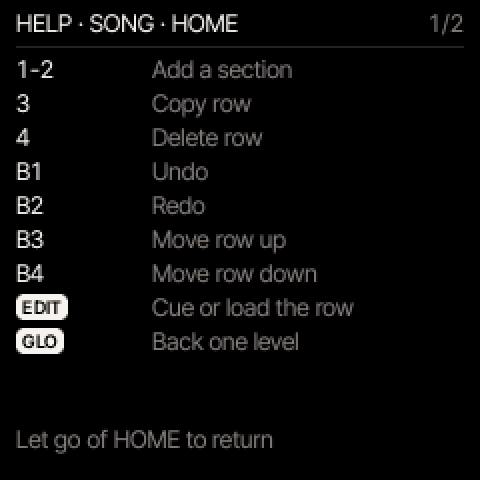
Hold HOME on any page, SONG and MIDI included. The lights stay on and the help lists what each lit key, button and knob does here. Let go to return.
OCT− OCT+ turn the help pages; the page count shows top right.
press to explain
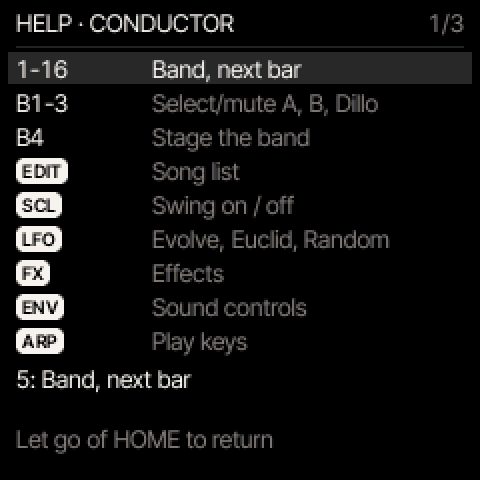
Keep holding HOME and press any key or button, or turn a knob: its row is picked out and the bottom line says what it does. Nothing else happens.
PLAY still starts and stops.
hold rec
Hold REC on its own for a moment to see this page's REC chords; the lights and the key legend switch to what each key does with REC. Any button, key or knob hides the help and works as usual.
attract

Leave RHYTHM CONDUCTOR alone for 30 seconds while playing and Dillo the armadillo takes over the screen. Press anything to bring the page back.
colours
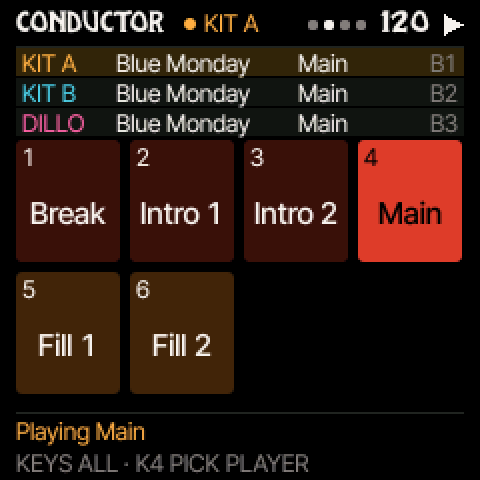
KIT A is orange, KIT B is blue and Dillo is pink, on every page and lane.
REC is the shift button: hold it, then press or turn a second control.
Each key has one job per page, and its light says so: one rule on every page (5.5).
the twelve buttons
| button | press | opens |
|---|---|---|
| HOME | Return to the selected instrument; hold for help. | CONDUCTOR / BIG BEAT / DILLO |
| ARP | Play the keys live. | PLAY |
| SEQ | Write steps on the white keys. | STEPS |
| ENV | Shape the drum voice or Dillo. | SOUND |
| FX | Five tabs: ECHO, TAPE DRIVE, SPRING, MOTION, SENDS. | FX |
| LFO | Opens EVOLVE; on EVOLVE each press is the next mode: EVOLVE, EUCLID, RANDOM. | EVOLVE |
| GLO | Tempo, swing, balance, transpose, MIDI and the SONG arranger. | GLOBAL |
| SAVE | Four scenes. | SAVE |
| SCL | Drums: swing on or off. Dillo: the next scale. | — |
| EDIT | Confirm, apply or store, as the screen says; on RHYTHM CONDUCTOR it opens the song list. | the song list (from CONDUCTOR) |
| PLAY | Start and stop; on the song list, load the selected song on KIT A, KIT B and Dillo together without stopping a running performance. | — |
| REC | Shift. |
select
On a HOME landing, turn to choose RHYTHM CONDUCTOR, BIG BEAT or DILLO. On a deeper page it selects the local player instead.
algo
Turn to open PATTERN and browse.
presets
Turn to open KIT and browse.
k1–k4
Turn to change what the bottom of the screen names.
| combo | does |
|---|---|
| REC + HOME | All notes off; the music keeps playing. |
| REC + SELECT | Tempo. |
| REC + ALGO | Queue the next or previous section. |
| REC + PRESETS | Drum voice; on Dillo STEPS, the step's pitch. |
| REC + key | Accent the hit or note. |
| REC + GLO | Tap tempo, on every page: tap three or more times. |
| REC + FX (hold) | Dub throw: the echo opens while you hold. |
| REC + SAVE | Quick save to the current scene (stopped). |
| REC + ENV | Dillo: the sound back to its preset. |
| REC + ARP | This layer on or off. |
| REC + SEQ | On PLAY or STEPS with a drum kit: record into the playing pattern. Elsewhere: the next 16-step bank. |
| REC + EDIT | On PLAY or STEPS: Undo. On other pages: mute or unmute the layer. |
| REC + SCL | On Dillo: the next key you press sets the scale's root. |
| REC + LFO | EVOLVE on or off. |
| REC + OCT−/+ | On PATTERN: page the black section keys, eleven at a time, up to 55. |
| REC + B1-3 on CONDUCTOR | Solo KIT A, KIT B or Dillo. This does not change the K4 scope. |
| K4 on CONDUCTOR | SCOPE: ALL, KIT A, KIT B or DILLO. HOME returns it to ALL. |
| REC + B1-4 on PLAY | Solo a drum group. |
| REC + 1-4 on SAVE | Load that scene (stopped). |
| REC + key on EVOLVE | Lock a step so EVOLVE leaves it alone. |
oct− and oct+ together
Holding OCT− and OCT+ together is the FM-1's own update gesture: BB1 does nothing else while both are held. Leave it to the installer.
Every key and button follows one rule, on every page. The screen's key map, the key legend and the help come from the same table, so they always agree with the lights.
four states
| light | means |
|---|---|
| bright | On, playing, or the page you are on. |
| half-lit | It works here. Half-lit is clearly visible, but dimmer than bright. |
| pulse | Waiting for the bar, or for you: a queued section, kit or start, or a delete waiting for EDIT. |
| off | Does nothing here, now. Pressing it does nothing. |
Sometimes you press keys one after the other, sometimes together. These drawings show which.
Screen text appears in capitals, as on the screen: KIT APPLIED.
single press
A key on its own: press it and let go.
combination press
Keys joined by a plus: hold the first, press the second.
sequence press
Keys joined by an arrow: one after the other.
hold
HOLD! above a key: keep it down.
tap
TAP! above a key: tap it, in time.
turn
TURN! above a knob or encoder: turn it.
hold and turn
Hold the key and turn the knob.
hold a key, turn a knob
Hold the white key and turn K4.
black keys
Black keys are B1 to B11, white keys 1 to 16.
chips
Controls in a sentence are drawn small: HOME, REC, SELECT, K1, white key 7, black key B3.
REC + SEQ means hold REC and press SEQ. ALGO → EDIT means turn ALGO, then press EDIT.
Tap HOME, then turn SELECT: RHYTHM CONDUCTOR, BIG BEAT and DILLO are three clear musical destinations. The screen changes with the instrument.
Changes land on the bar, so you can line up the next one while this one plays.
rhythm conductor
RHYTHM CONDUCTOR is the bandleader view: all three players, the song sections and the next-bar cue in one place.
K4 SCOPE chooses ALL, KIT A, KIT B or DILLO without muting anything. White section keys cue all three. Hold REC while pressing a section key to redirect the player picked with K4. HOME restores ALL. B1 B2 B3 mute, or solo with REC.
big beat
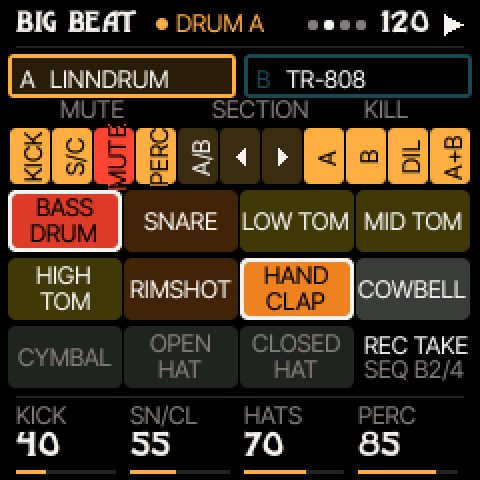
Play the white pads on the highlighted drum deck. Press black key B5, marked A/B, to switch decks. PRESETS opens drum kits, ALGO opens patterns and SEQ opens steps.
dillo
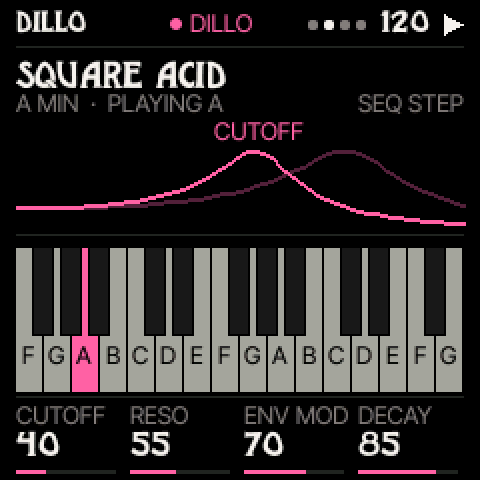
DILLO has its own live acid-bass screen. Its keys, filter, patch and pattern controls are immediately visible instead of hiding behind a drum focus outline.
PRESETS opens sounds, ALGO opens ACID phrases and SEQ opens Dillo steps.
play the second kit
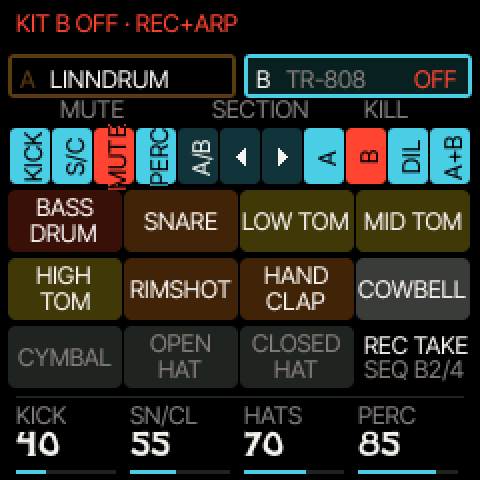
In Big Beat, press B5 to select Drum B. If the screen says KIT B OFF, hold REC and press ARP. Play the white pads to hear the second kit. Press B5 again to return to Drum A. In the browser, you can also choose Enable Drum B in the sound notice below the display.
one song for the band
On the song list, PLAY always loads the song on KIT A, KIT B and Dillo together. It starts when stopped and keeps playing when already running. EDIT loads all three without starting: at once when stopped, on the next bar when playing.
one key moves the band
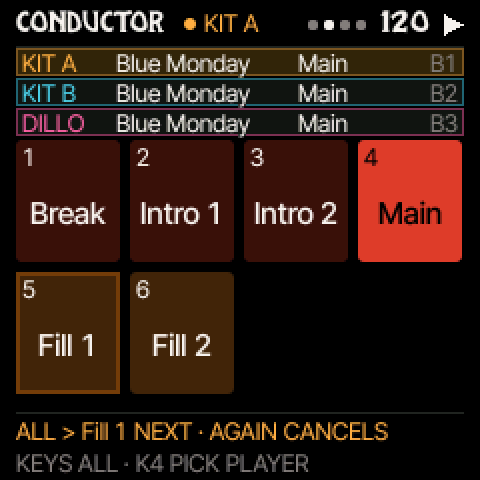
On RHYTHM CONDUCTOR each white key is a named section. The phone player names the same sections on its touch keys. One press moves the whole band to it on the next bar.
mixed songs
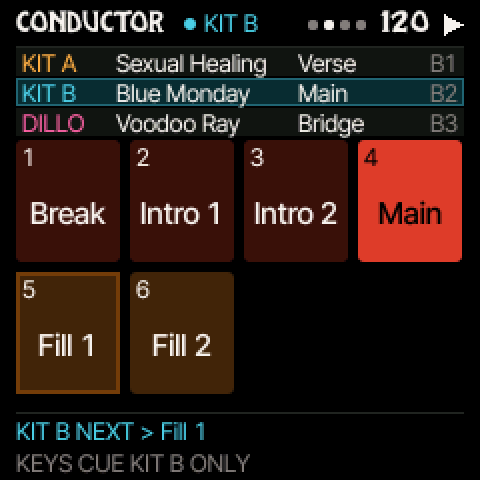
Each row shows its own song and section. A redirect moves one player. The next plain section press brings all three back to the band’s song. When the rows show different songs and no cue is pending, CUE SONG names the song behind the section keys. Within a split song, the status names the focused player’s section. OTHERS VARY means the other two are on different sections.
change your mind
While a single-player redirect is waiting, press a section key without REC to replace it with a whole-band cue. Once the bar has turned, cue the band again to bring it back together.
Press PLAY to stop playback and discard a waiting cue. Starting again keeps the parts that were already playing.
choose a kit
Turn PRESETS, then press EDIT. BB1 moves to PATTERN: CHOOSE PATTERN / EDIT: CHOOSE.
confirm the pattern

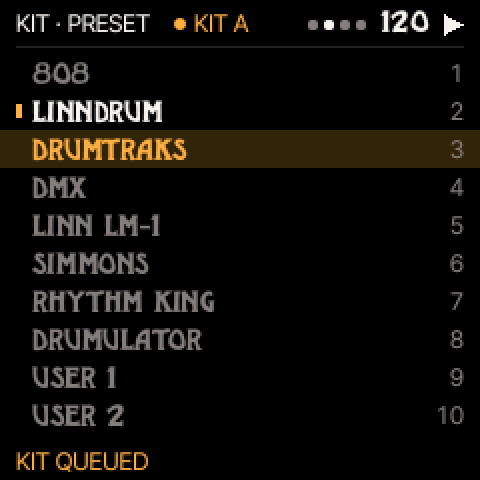
Press EDIT on PATTERN. The kit and the pattern arrive together on the next bar: KIT QUEUED, then KIT APPLIED.
next up
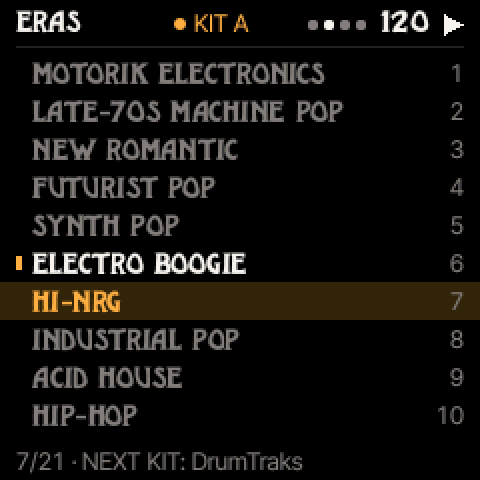
Until then the bottom line reads NEXT KIT: and the kit's name.
your own copy
The first step you change in a library pattern makes an editable copy; the original stays in the library.
undo
REC + EDIT on PLAY or STEPS undoes the last edit or kept take, up to eight back.
scenes
SAVE keeps the whole setup in one of four scenes (chapter 11.8).
songs
SONG, on GLO white key 4, arranges sections into a song. It lives in memory: once you change it the grey line reads EDITED RAM / PROJECT FILE TOOLS.
Let's play a song with the whole band, move it section by section, then add a machine, a sound, echo and a saved scene.
Then write steps of your own.
1volume down
Turn MASTER down. Start low.
2the song list
Switch on: BB1 opens on the welcome card. Press EDIT for the song list. From a playing page, press HOME, then EDIT.
3pick a song
Turn ALGO or press a white key 1–16. OCT− OCT+ turn the list page.
4play it
Press PLAY, then bring MASTER up. KIT A, KIT B and Dillo play the song together, with its own tempo and swing, and RHYTHM CONDUCTOR shows its sections.
5mute one
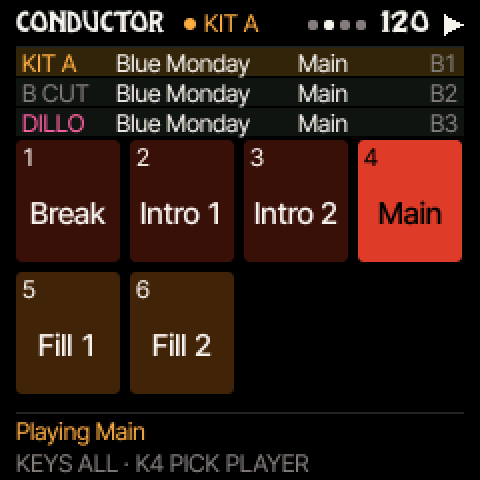
Press B2: KIT B mutes and its row reads B CUT. Press it again to bring it back.
6move the band
Press a white key: the whole band moves to that section on the next bar. Until then its button and key pulse.
7mix and scope
K1, K2 and K3 mix DRUM A, DRUM B and DILLO. K4 chooses the visible section scope: ALL, KIT A, KIT B or DILLO.
8a second machine
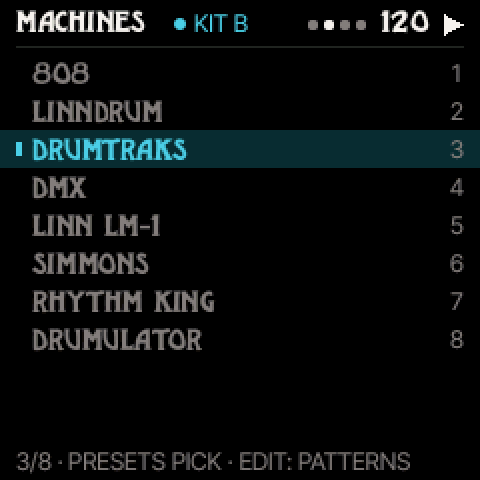
Tap HOME, turn SELECT to BIG BEAT and press the black key B5 marked A/B to select KIT B. If it is off, hold REC and press ARP to enable it. PRESETS, EDIT, ALGO, EDIT chooses and applies its machine and pattern without replacing KIT A.
9dillo's sound
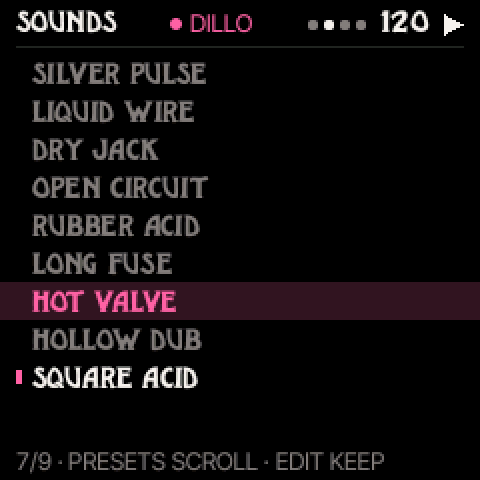
Tap HOME, turn SELECT to DILLO, then turn PRESETS while you play the keys: each sound arrives when you stop turning.
10echo
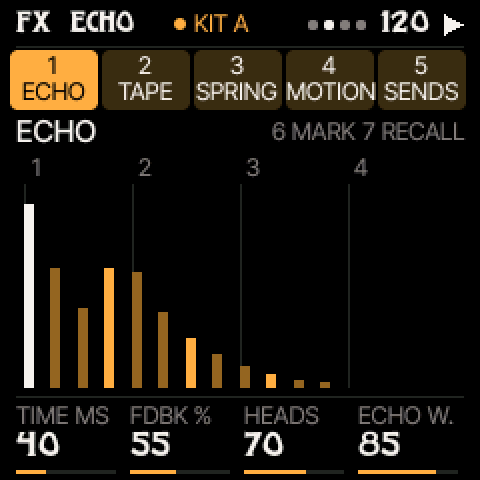
Press FX. K4 is ECHO WET: how much echo you hear.
11throw it
Hold REC and hold FX: the echo opens while you hold, then snaps back.
12keep it
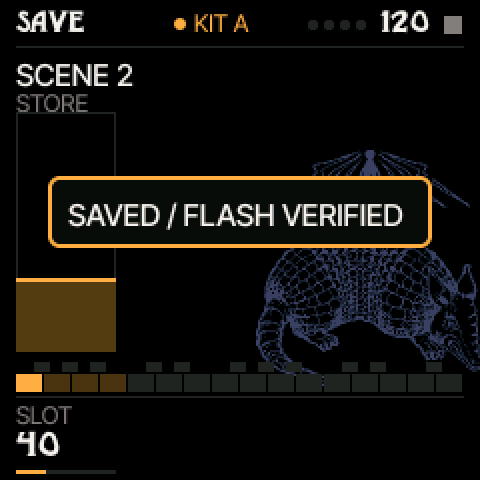
Stop, press SAVE, pick a scene with keys 1–4 and press EDIT: SAVED / FLASH VERIFIED.
From the welcome screen, turn SELECT straight to BIG BEAT. From another page, tap HOME first. The first eleven white keys play the pads right away, even with playback stopped. Try a few sounds before opening SEQ.
On a computer keyboard, hold Shift and press Up or Down to turn SELECT. From HOME, use it to move between RHYTHM CONDUCTOR, BIG BEAT and DILLO. Press / for SEQ and H for HOME.
In the browser, choose Open drum pads from the welcome screen to jump straight to Big Beat. On a phone, the shortcut brings the audio control or the first pads into view. If browser volume is at zero, choose Enable pad audio to set it to 20%. Tap a pad or press PLAY to start sound. Use Enable sound if the browser asks, and bring up the volume if it is at zero. On a phone, SELECT sits under the screen and the other encoders sit below the keys. On the FM-1, bring MASTER up gently.
1steps
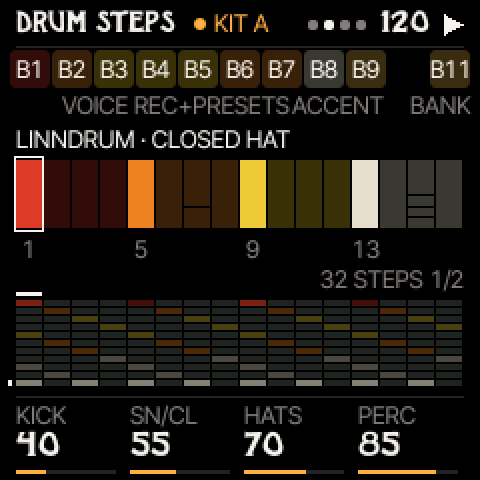
Press SEQ. The 16 white keys switch steps 1–16 on and off for the selected voice, even with playback stopped. Tap HOME to return to the pads.
2voice
Black keys B1–B8 choose KICK to HIGH CONGA; REC + PRESETS reaches every voice.
3accent
Hold B9 while you set a step to accent it.
4ratchet
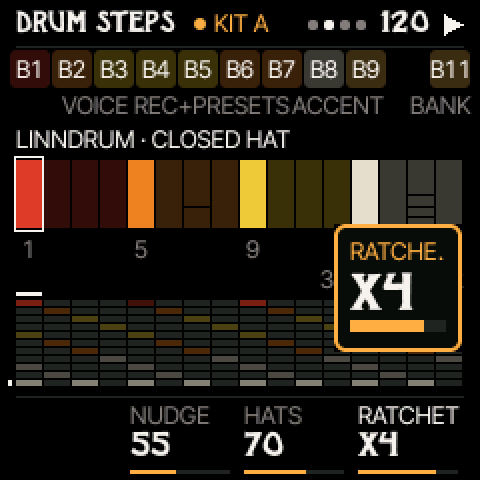
Hold a step key and turn K4: that step repeats x1 to x4. K4 reads RATCHET while you hold.
5nudge
Hold an occupied drum step and turn K2: NUDGE moves that hit from −8/16 to +7/16 of one step. Release the key to queue the change.
6more steps
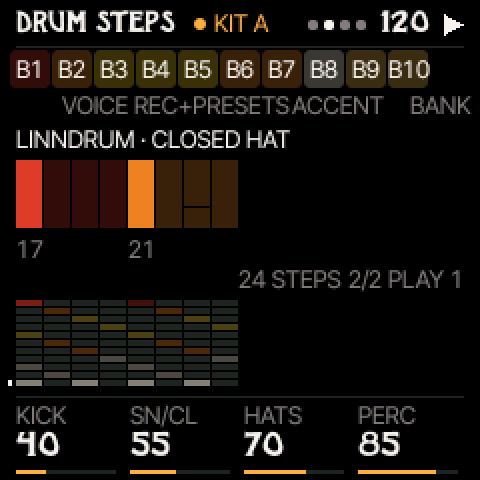
OCT− OCT+ or B10 B11 move between 16-step banks; a pattern has up to 64 steps. The numbers under the step keys show their positions in the full pattern. PLAY 1 means playback is in bank 1 while you edit another bank.
7undo
Use REC + EDIT to undo a step edit on the startup drum grid or a loaded catalogue pattern. On the startup grid, Undo restores the hit and its accent.
keep your beat
In the browser, stop playback and choose Save project to keep the drum steps in a .bbp2 file. Use Open project to bring the beat back, then return to BIG BEAT and press SEQ.
Every button opens one page. This chapter takes them one by one, with a key map for each.
On the key maps, highlighted keys do something on that page; labels are the firmware's own, and each key carries its light: bright, half-lit or pulse (5.5).
RHYTHM CONDUCTOR is the coordinated playing screen: the song, its sections as buttons, and KIT A, KIT B and Dillo. EDIT opens the SONGS, ERAS and PRESETS list.
When you return to Conductor from SONG playback, the three players show their sources from the current arrangement row. A working part keeps its source name and is marked with an asterisk on the unit or Working in the browser. Stopping keeps the loaded row visible.
In the browser, Current parts repeats the three players’ songs and sections in text. On a phone, it sits just below the Sections keys. Next at the bar names the queued destination and who will move. The current parts stay visible while the cue waits. For a rhythm combination, it lists the rhythms each drum kit is playing and the lead section Dillo follows. To redirect one player in the browser, choose a player and any section in the current song or rhythm bank below Current parts, then press Queue redirect. You can choose a section from another page without moving the panel grid. Use Cancel cue to keep the current parts playing when a cue is waiting.
Tap HOME to return to the selected instrument. Turn SELECT there for RHYTHM CONDUCTOR, BIG BEAT or DILLO; PLAY on the song list loads all three players and returns to the Conductor.
the song list
on screen

songs, eras, presets
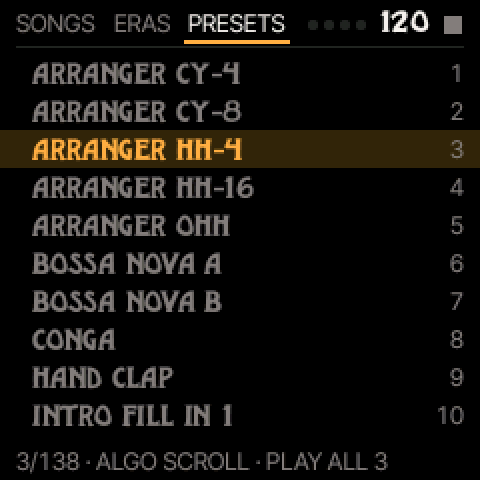
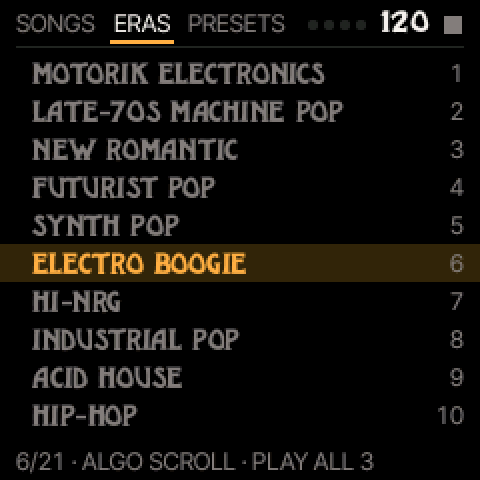
SONGS lists the 67 named songs, numbered 1–67. ERAS lists the 21 eras. PRESETS lists all 138 rhythms in one list. Pick a rhythm to load it on all three players. Rhythm Conductor then shows the other rhythms from the same machine.
On TR-77, A and B distinguish the two Bass rhythms and the two Bass & Snare rhythms.
Dillo's ACID phrases are on Dillo's PATTERN page (9.5).
eras
change one later
A song always loads KIT A, KIT B and Dillo together. To make your own combination, select a player afterward and choose its PATTERN independently.
rhythm conductor
on screen

waiting for the bar
A queued section pulses, on its button and its key, and the line under the buttons says so. If you turn to another page while a single section is queued, the status keeps the section name and says who will move next. Long names are shortened to fit, with the name taking priority over the cancel hint.
stopped
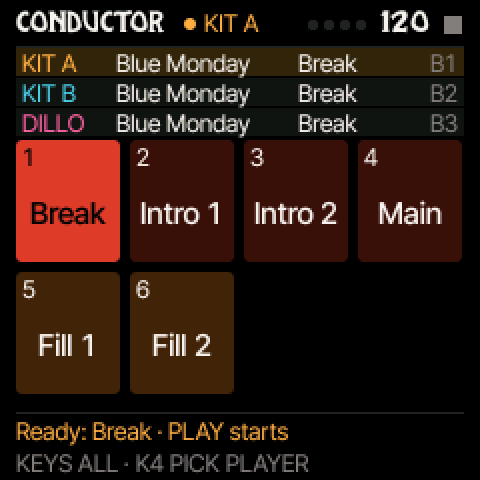
Stopped, the line reads Ready: and the section; PLAY starts it.
muted
CUT means the player is muted. OFF means the drum kit is disabled. SOLO identifies the player you isolated. Hold REC and press its black key again to clear the solo. For an OFF kit, select its deck in Big Beat, then hold REC and press ARP.
mixed songs
Here only KIT B has a section queued. KIT A and Dillo keep playing the songs and sections shown on their rows.
all or nothing
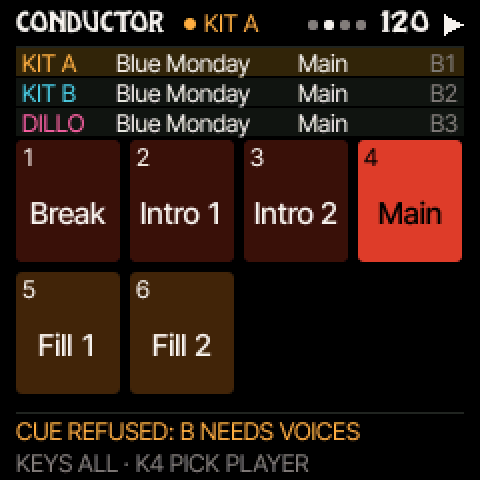
If one player cannot play the section, nothing changes and the screen names it: CUE REFUSED: B NEEDS VOICES. A cue that could not be ready in time says MISSED THE BAR; the music carries on.
names always fit
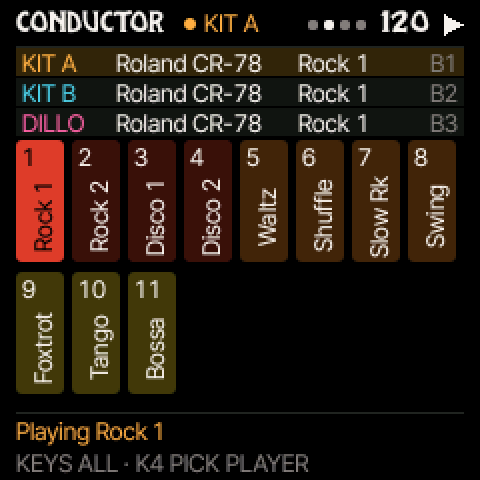
One to four sections make one row of tall buttons, five to eight two rows of four, nine to sixteen two rows of eight. A long name turns on its side (read bottom to top), or takes a fixed short form; no letter is ever cut.
the last page of the tr-66
on screen

every section has a key
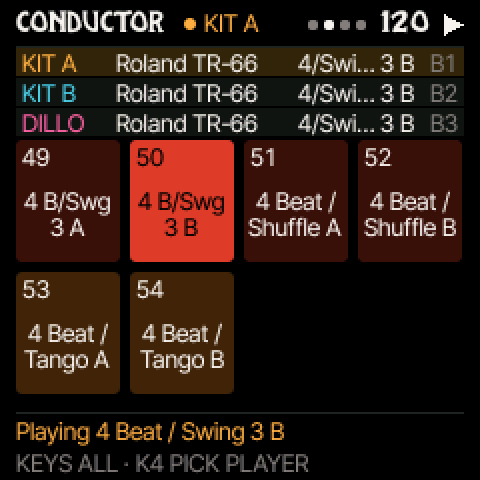
Roland TR-66 has 54 rhythms: OCT+ three times shows 49–54 on keys 1–6, and the rest stay dark. The CR-8000 has 43 on three pages.
song playing
While the SONG arranger plays an arrangement, the section keys are off and say SONG PLAYING.
| the song list | does |
|---|---|
| 1-16 or ALGO | Move the cursor on this page of the list. OCT− OCT+ turn the page. |
| song cues | The marker stays with the current band song until the change. The next song pulses on its title and key. |
| B5 B6 B7 | SONGS, ERAS or PRESETS: the tab shown is bright and underlined on screen. |
| PLAY | Loads the song's initial section on KIT A, KIT B and Dillo, all together, with the song's own tempo and swing; then RHYTHM CONDUCTOR. It starts if stopped and keeps playing if already running. If BB1 is too busy it says BUSY - RETRY and changes nothing. |
| EDIT | CHOOSE: loads it the same way without starting (on the next bar if already playing), then RHYTHM CONDUCTOR. |
| HOME | To the selected instrument without choosing. |
| K1-K4 | On the song list: DRUM A, DRUM B, DILLO and FX RET. On RHYTHM CONDUCTOR: the first three mix those players and K4 is SCOPE. |
| rhythm conductor | does | |
|---|---|---|
| 1-16 | Press a section key to cue all three at the next bar. To move just one player, select it with K4, then hold REC and press the section key. | |
| OCT− OCT+ | The next sixteen sections; the screen says SECTIONS 17-32, and so on up to SECTIONS 49-64. Keys past the song's last section stay dark and do nothing. | |
| B1 B2 B3 | Mute KIT A, KIT B or Dillo. Hold REC to solo one player. Repeat that gesture to end the solo and restore the previous mix, including any layer that was off. Press its black key without REC to mute that player and bring the others back to their previous mix. These keys never change the section scope. | |
| B4 | Stop, then press the lit BAND key to preview the current three parts in SONG ADD. Press EDIT to add the row. | |
| K4 | SCOPE: ALL, KIT A, KIT B or DILLO. It picks the player for a REC + section redirect. Plain section keys always cue the whole band. If you turn K4 and press a section key with REC in the same instant, only the scope changes. Release the section key and press it again once the target is visible. HOME restores ALL. In the browser’s Controls view, the K4 row shows All Three or the current REC target. With a computer keyboard, hold Shift and press Left or Right to turn K4. | |
| change your mind | Press another section before the bar and the newest wins. Press the pulsing key again, or the one that is playing, to cancel. PLAY to stop cancels too: CANCELLED BY STOP. | If the bar comes before a cancel can land, the section plays and the screen says TOO LATE TO CANCEL. |
| SELECT | On this landing, chooses RHYTHM CONDUCTOR, BIG BEAT or DILLO and changes the visible instrument. K4 controls local player scope inside the Conductor. | |
| EDIT | Back to the song list. | |
| ARP SEQ | Open PLAY or STEPS. |
PLAY · ARP turns the keys into drum pads, or Dillo's keyboard.
key map
on screen
read the pads
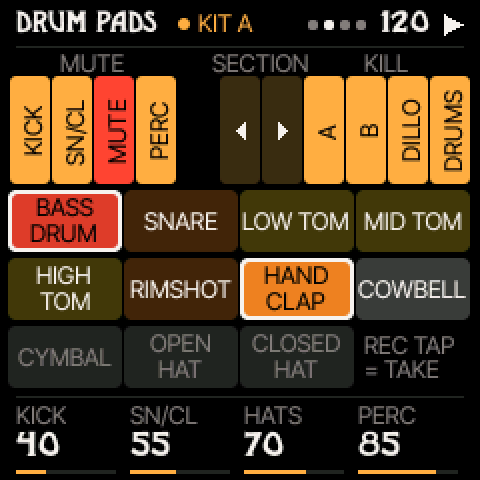
Read the pad grid like a book, left to right across each row, then down. The eleven named pads match the first eleven white keys from the left. The row of controls above them matches the black keys. Pad colours group the voices; flashes follow pattern hits or your fingers. The phone player names the pads for the kit you are playing.
When the top strip gives a reason why this kit is silent, its pads stay dim. On Drum Pads, a muted kit can be restored with B8 for Kit A or B9 for Kit B. You can still select a voice with a pad while its kit is off. Hold REC and press ARP to switch the kit on and hear it.
On the Big Beat landing, S/C is the snare and clap group. Under KILL, DIL cuts Dillo and A+B cuts both drum kits.
On the Big Beat landing, black key B5 marked A/B switches which kit you play and edit. A pad hit as you switch goes to the new deck. Both kits keep their on or off state. Tap REC for TAKE, or press SEQ for Steps. The final tile shows the current and total bar as Bn/N.
The browser group mix beside the pads shows the gain setting and mute or solo state for Kick, Snare / clap, Hats and Percussion on the selected deck. Its buttons use the same group controls as the panel.
In the browser, use the Drum A and Drum B buttons above the pads to choose which kit to play. The browser sound notice on Pads and Steps lets you enable or unmute the selected kit, clear an instrument solo, or raise a zero kit level. Enabling an off deck preserves its mute setting. Steps also offers Enable sound at 20% when the browser volume is at zero. On a phone, the function keys name their current actions. Hold REC to see which keys switch from mute to solo.
dillo on play

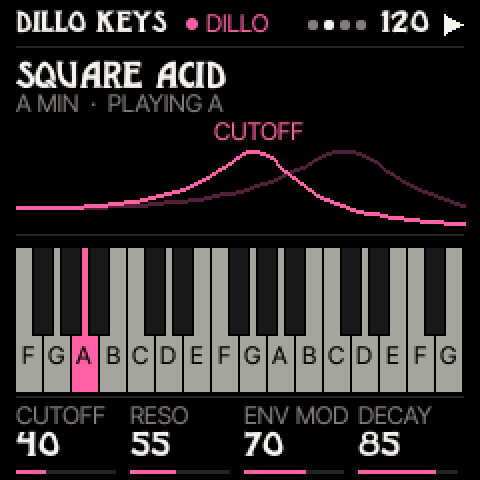
With DILLO selected the keys play notes; OCT− OCT+ move them up to two octaves either way, and SCL steps through OFF, MINOR, MAJOR, DORIAN and PENTA.
The keyboard shows the notes under your fingers. Above it, the filter curves respond to cutoff, resonance and envelope settings.
Knobs: CUTOFF, RESO, ENV MOD, DECAY.
| control | does |
|---|---|
| 1-11 | Pads: kick, snare, low, mid and high tom, rim, clap, cowbell, cymbal, open hat, closed hat. Hold REC for an accent. |
| B1-4 | Mute KICK, SN/CL, HATS or PERC; with REC, solo. |
| B6 B7 | Previous or next section, on the bar. |
| B8-11 | Kill DRUM A, DRUM B, DILLO or ALL DRUMS. |
| K1-K4 | KICK, SN/CL, HATS and PERC group levels. If a group shows 0%, turn its knob up. Its pads stay dim at zero. |
| SCL | Swing on or off: SWING ON, SWING OFF. |
STEPS · SEQ writes a pattern step by step on the white keys.
key map
on screen

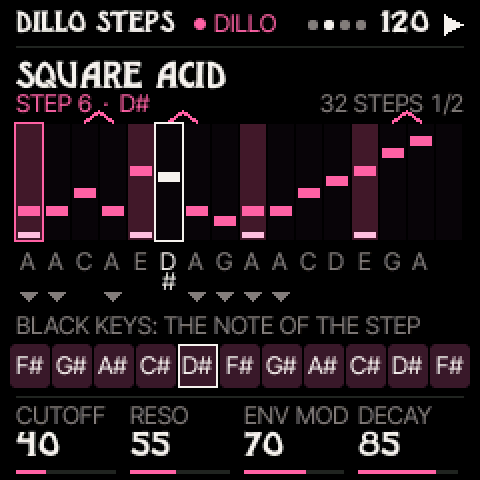
read the drum steps
The machine and selected voice stay named above sixteen tall step keys. The smaller rows beneath show the other drum lanes; divisions within a step show ratchets.
The line below the numbered keys shows the total pattern length. On longer patterns, 2/2 means bank two of two, and PLAY 1 means the first bank is playing. Keys and columns after the last step go dark.
In the browser, the line above the Drum A or Drum B voice list repeats the visible step range and total pattern length on every layout. Choose any voice below it; the first eight black keys also show their actual voice names. Choosing a voice keeps the current step bank and does not write a hit. Use Hear voice to audition it through the current drum mix without adding a step or recording it.
On a phone, the touch keys show the actual step numbers. The heading gives the visible range and the total length. A dash means that key is outside the pattern.
When you edit a playing catalogue drum pattern, the grid shows the change straight away. While the screen says STEP QUEUED, you still hear the old pattern. At the next loop, STEP APPLIED confirms the change. The browser panel repeats that distinction beside the visible step range as Edit queued or Edited pattern playing. Hold REC and press EDIT to undo it.
read Dillo steps
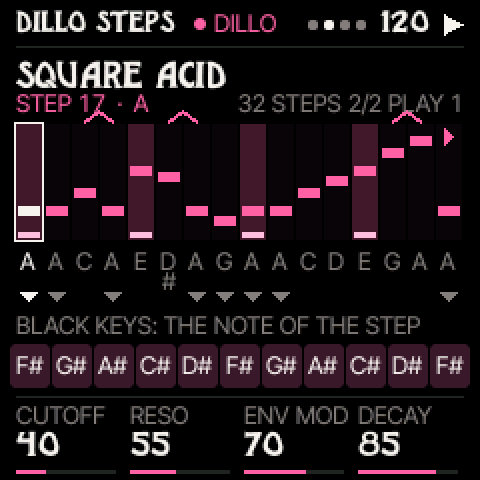
Pitch bars show the notes, arcs join slides, and accent marks show emphasis. A right arrow marks a slide into the next bank or back to the start of the phrase. The black-key row names the pitches available for the selected step. The readout gives the phrase length and which 16-step bank is open. Keys after the last step stay dark. The selected step number counts from the start of the phrase. PLAY 1 means the phrase is playing in bank 1 while you edit another bank.
visible steps but no sound?
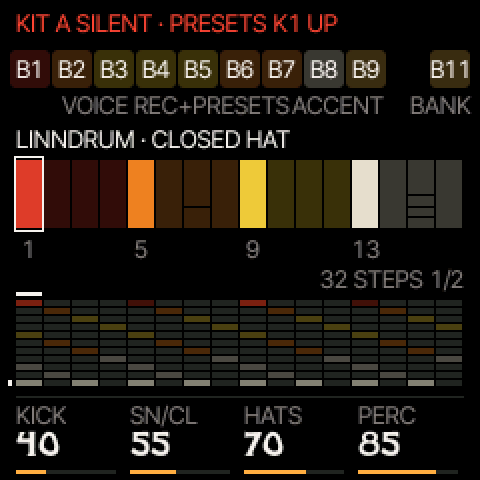
The top strip says why and names the recovery: turn MASTER up; use REC + ARP for a layer that is OFF; follow the named mute key route for a MUTED part (COND means Rhythm Conductor); or raise that instrument with PRESETS K1. A short action message temporarily replaces this reason.
BB1 removes the old hidden shared drum level when it opens a scene: its gain is folded into the visible Kit A and Kit B levels, so silence always has a control you can reach.
| control | does |
|---|---|
| 1-16 | Steps 1–16 of this bank, for the selected voice. |
| B1-8 | Quick-select the first eight voices. The selected voice is named beside the drum machine above the steps. |
| REC + PRESETS | Hold REC and turn PRESETS to reach the rest of the voices without leaving Steps. The screen labels this shortcut above the voice name. |
| B9 | Hold to write accented steps. |
| B10 B11 | Previous or next bank. |
| hold a step + K4 | Ratchet x1–x4. |
| hold a hit + K2 | NUDGE moves an occupied drum step from −8/16 to +7/16 of one step. Release the key to queue it. |
| Dillo: B1-11 | Pitch keys light when you select a note in the bank on screen. REC + PRESETS also changes that note. EDIT sets the step type: GATE, ACCENT or SLIDE. |
KIT · PRESET is the full-screen list of kits for KIT A or KIT B, or Dillo's sounds (PATCH · PRESET): ten rows, the playing one marked, the white key of each row on the right, and one line at the bottom. Turn a knob and its value shows at the bottom for about a second.
key map
on screen

the list
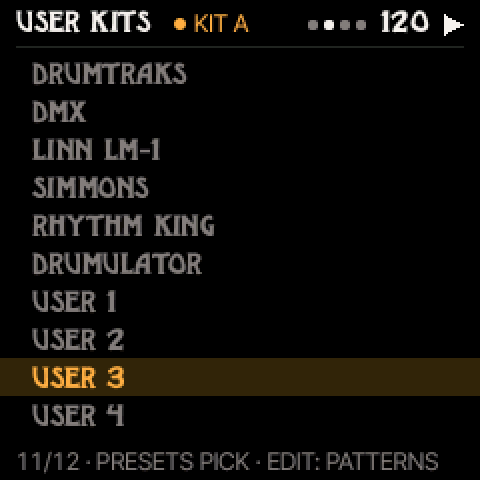
Drums: 808, the seven sampled machines and, on KIT A, USER 1–4.
The bottom line counts the list and names the controls: turn PRESETS to scroll and press EDIT to keep the sound. It reads LOADING while a sound is on its way.
dillo sounds
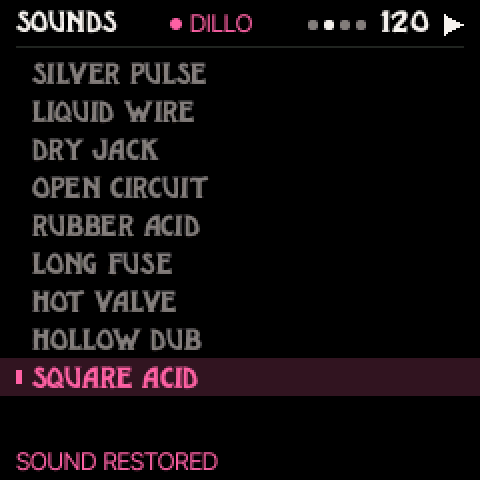
On DILLO the page is PATCH: the nine Dillo sounds, without key numbers, because the keys stay notes so you can keep playing while you choose.
Turn PRESETS and the sound under the cursor loads about a third of a second (350 ms) after you stop turning; sounds you scroll past are not loaded, and held notes keep sounding.
EDIT (KEEP) loads it now and stays on the page; SOUND KEPT shows once the new sound is playing. HOME puts back the sound you had before you started turning, your own edits included: SOUND RESTORED. Leaving any other way keeps the new sound.
OCT− OCT+ move the keys an octave, as on PLAY.
dillo patch keys
home restores
| control | does |
|---|---|
| PRESETS | Move through the list. |
| 1-16 | Pick straight from this page of the list. |
| OCT− OCT+ | The previous or next page of the list. |
| EDIT | Drums: CHOOSE, then confirm a pattern. Dillo: KEEP. |
| B1 | KIT A only: BUILD, the kit builder (chapter 11.6). |
| K1 | Layer level. |
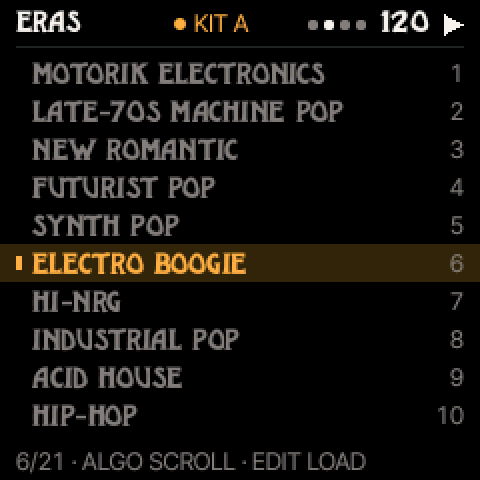
PATTERN · ALGO is the list of patterns for the selected player: ERAS, then SONGS, and on Dillo the 27 ACID banks after them. It works only on that player; the song list (9.1) moves the band.
key map
on screen
substitutions
If the kit lacks a voice the pattern asks for, the bottom line names the swap, for example SUBST SY>CB +1; a kit waiting for the bar reads NEXT KIT: and its name.
acid
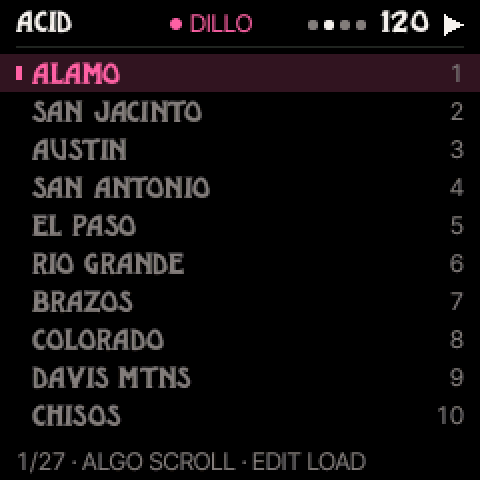
On DILLO the list carries on from SONGS into ACID: 27 banks, 205 phrases.
| control | does |
|---|---|
| ALGO | Move through the list, from one collection into the next. The status strip names ERAS, SONGS or ACID; the bottom line shows your position and says ALGO SCROLL. REC + ALGO queues the next section of what plays. |
| 1-16 | Pick from this page of the list. |
| B1-11 | Launch a section of this player's pattern, on the bar. REC + OCT− OCT+ page the keys, up to section 55. |
| EDIT | CHOOSE: load it, on the bar while playing. Stopped, PLAY confirms and starts. |
| K1-K4 | Drums: LEVEL, TUNE, DECAY, SWING. Dillo: CUTOFF, RESO, ENV MOD, DECAY. |
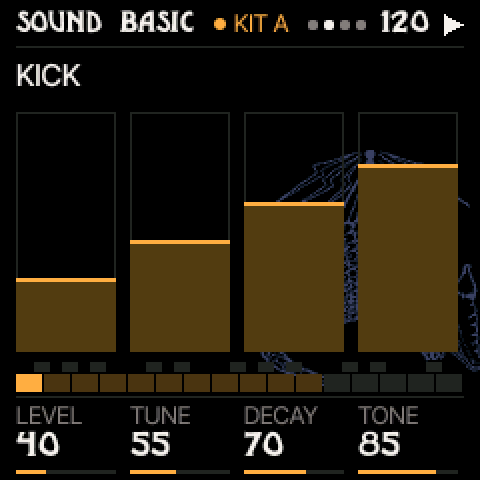
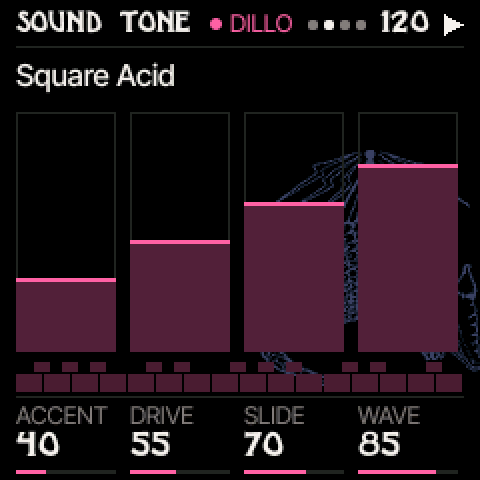
SOUND · ENV shapes the selected drum voice, or Dillo.
key map
on screen

| control | does |
|---|---|
| 1-11 | Choose the drum voice. |
| OCT− OCT+ | BASIC or COLOUR knobs. |
| BASIC K1-K4 | LEVEL, TUNE, DECAY, TONE. |
| COLOUR K1-K4 | Depends on the voice: kick TONE, ATTACK, DIST, LEVEL; snare TONE, SNAPPY, DIST, LEVEL; toms MODE, DRIVE, DIST, LEVEL; clap MODE, ATTACK, DIST, DRIVE; the rest DIST, TUNE, DECAY, DRIVE. |
| Dillo K1-K4 | ACCENT, DRIVE, SLIDE, WAVE; the keys play notes. |
| REC + ENV | Back to the preset: SOUND BACK TO ITS PRESET. |
FX holds the tape echo and the spring on five named tabs: ECHO, TAPE DRIVE, SPRING, MOTION and SENDS.
White keys 1–5 choose a tab, the bright one is shown, and the tab row on screen names them. OCT− OCT+ step through them. FX opens on the tab you used last.
key map
read the effects
ECHO lays out the selected delay heads and their repeats against four beats. TAPE DRIVE, SPRING and MOTION draw the effect settings; SENDS shows each player feeding echo and spring. These pictures respond to the controls; they are not recordings of the audio output.
echo

K4 ECHO WET is how much echo you hear, on every tab but SENDS.
tape drive

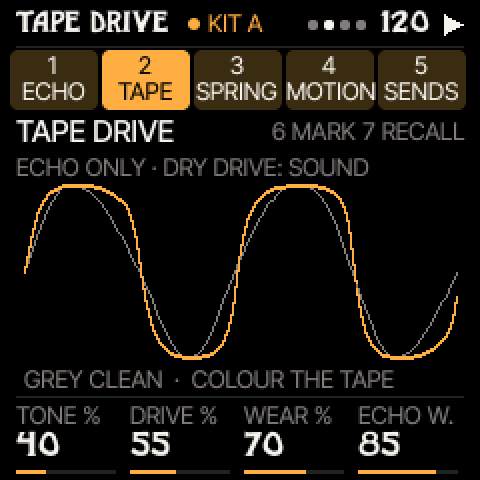
TAPE DRIVE saturates the echo's repeats only; the dry sound never passes through it. The screen says so: ECHO ONLY · DRY DRIVE: SOUND.
Dry drive is on SOUND: Dillo's DRIVE, and DRIVE and DIST on a drum voice's COLOUR tab.
spring

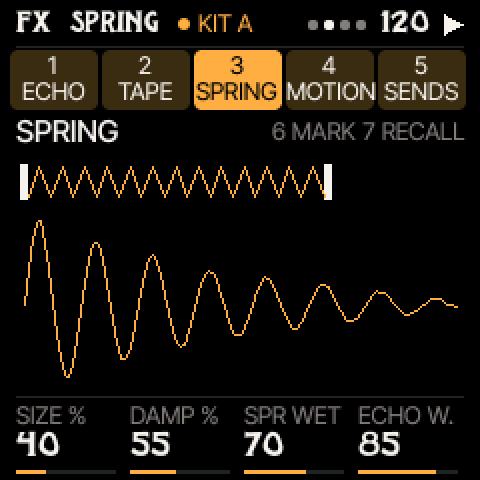
SPR WET is how much spring you hear.
sends

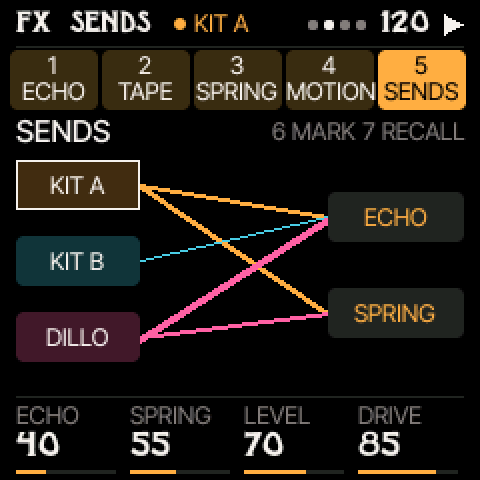
SENDS sets how much of the selected player goes to the echo and the spring.
mark and recall
Press white key 6 on FX to mark the current echo and spring settings. Change the sound, then press 7 to recall the mark while the music keeps playing. The instrument sends stay where you set them. The mark lasts until restart.
dub throw
REC + FX, held: the echo opens wide while you hold, then snaps back. The FX pages keep the effect controls together.
| tab | K1 | K2 | K3 | K4 |
|---|---|---|---|---|
| 1 ECHO | TIME MS | FDBK % | HEADS | ECHO WET |
| 2 TAPE DRIVE | TONE % | DRIVE % | WEAR % | ECHO WET |
| 3 SPRING | SIZE % | DAMP % | SPR WET | ECHO WET |
| 4 MOTION | MOTION % | WEAR % | FDBK % | ECHO WET |
| 5 SENDS | ECHO | SPRING | LEVEL (drums) | DRIVE (drums) |
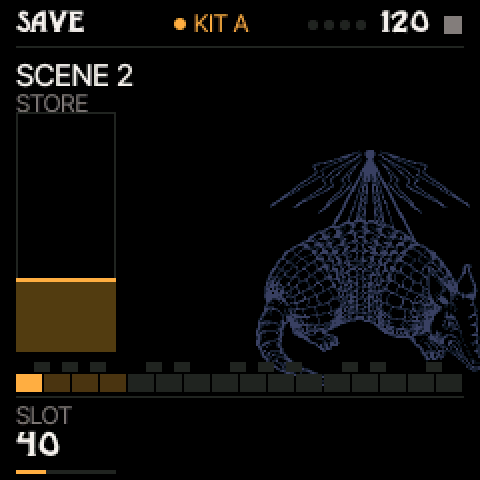
SAVE keeps the whole setup in one of four scenes.
key map
on screen

| control | does |
|---|---|
| 1-4 or K1 | Choose scene 1–4. |
| EDIT | STORE, while stopped. |
| REC + 1-4 | Load that scene, while stopped: LOADED / PRESS PLAY. |
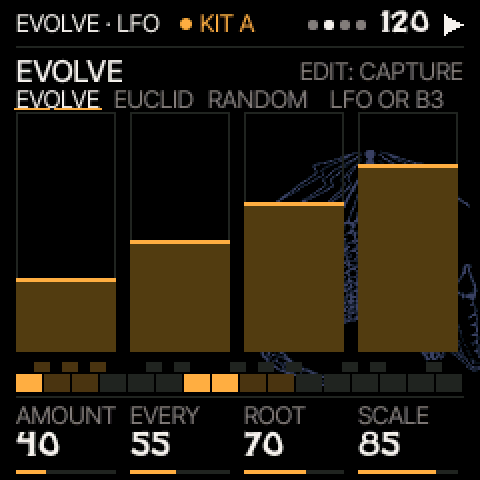
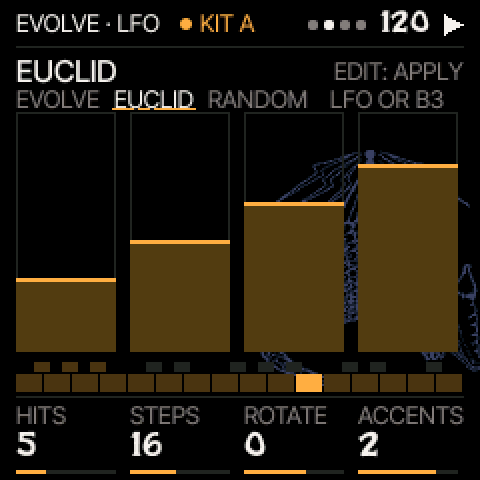
EVOLVE · LFO lets a pattern wander and come home, or generates new ones. LFO opens it; each further press steps the mode: EVOLVE, EUCLID, RANDOM. The mode is the title, with the three as tabs.
key map
on screen

| control | does |
|---|---|
| LFO or B3 | The next mode, without changing the music. The tab row reads LFO OR B3. |
| 1-3 | EVOLVE: parts to evolve, KIT A, KIT B, Dillo; bright when chosen. |
| 7-10 | EVOLVE: what may change, rhythm, pitch, accent, slide; bright when allowed. |
| 1-16 in EUCLID | On drums, the voice it writes; bright on it. RANDOM uses no white keys. |
| K1-K4 | EVOLVE: AMOUNT, EVERY, ROOT, SCALE. EUCLID and RANDOM: their own settings (chapter 11.4). |
| B1 B2 | FREEZE, RETURN. |
| EDIT | EVOLVE: CAPTURE, what plays becomes home. EUCLID and RANDOM: APPLY, the generator's pattern. |
| REC + white key | Lock that step, in every mode; bright when locked. |
| REC + LFO | EVOLVE on or off. |
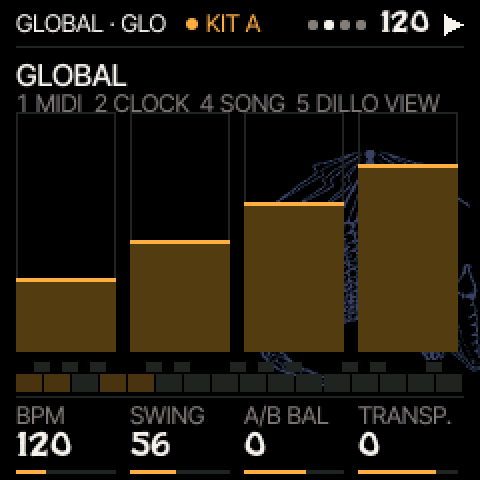
GLOBAL · GLO sets tempo, swing, the A/B balance and Dillo's transpose, and opens the MIDI pages.
key map
on screen

| control | does |
|---|---|
| K1 | BPM, 30 to 300. |
| K2 | Swing, 50 to 75 % in half steps. |
| K3 | A/B BAL: turn right for more KIT B. |
| K4 | TRANSPOS: Dillo's pattern, up to 48 semitones either way. |
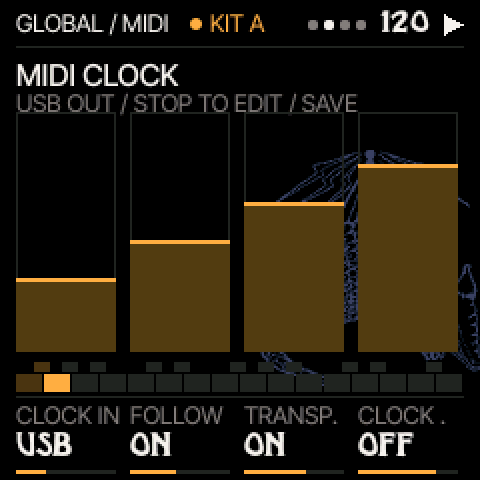
| 1 2 | MIDI CHANNELS and MIDI CLOCK (chapter 13). There, B1 or HOME goes back, and EDIT or SAVE keeps the settings. |
| 4 | The SONG arranger (9.11). |
| 5 | With KIT A or KIT B selected: the drum view, which voices are triggering. HOME or GLO leaves. With DILLO selected it is off. |
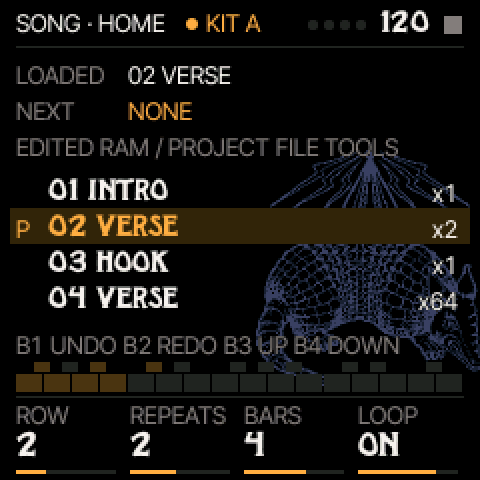
SONG · HOME arranges sections into rows and plays them in order. GLO then white key 4 opens it.
The line below the rows lists key shortcuts. When a delete is pending, it shows EDIT to confirm and HOME to cancel.
PLAYING, LOADED and NEXT name the row number as well as the section, so copies of the same section are easy to tell apart.
At the end of a longer song, the list keeps the last four rows in view.
The count at the right of each row shows how many times that section plays. Turn K2 to change the selected row's repeat count.
key map
song

a row turned
help
add
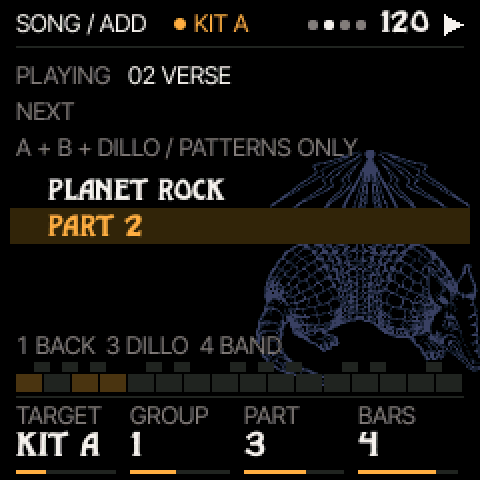
ADD: K1 TARGET, K2 GROUP, K3 PART, K4 BARS; ALGO the source bank. Key 3 plays the section without Dillo; key 1 goes back.
add the Conductor band
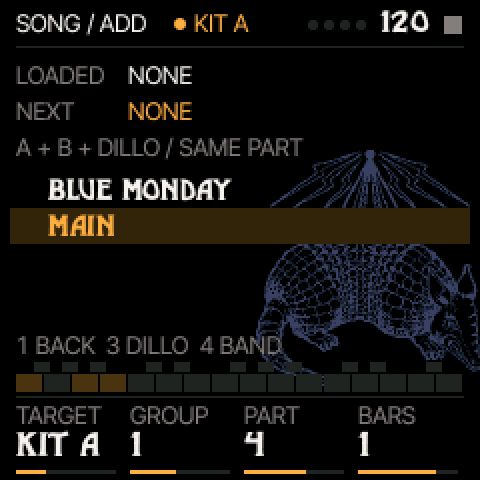
Stop playback in Conductor and press B4 BAND to stage the patterns last applied to Kit A, Kit B and Dillo. You can also open GLO > white 4 > ADD, then press white 4 BAND. Press EDIT to add the row.
In the browser, stop and choose Stage band for song under Current parts. The same BAND preview opens with all three staged parts and the row length in view. Combined and working patterns are marked, and an excluded Dillo shows No part. Choose Add row below the preview, or press EDIT. Use Play song on the row list to hear the arrangement.
ADD shows A + B + DILLO / SAME PART when all three use the same catalogue section. An asterisk beside a player means BAND will add its edited or combined pattern. Choosing another source clears the asterisk for that player.
BAND keeps individual redirects and drum combinations. ADD shows COMBO for a kit playing a combination. Choose a different source for a kit to replace its combination with a single pattern.
Identical edits or drum combinations from the same catalogue source share one working part across SONG rows.
BAND sets the row length from the last whole-band section. A redirect keeps its own pattern length. Turn K4 to change the row length.
BAND saves applied edits from both drum kits and Dillo. Rhythm Conductor keeps the source section visible and marks parts edited since their last recall with an asterisk.
While playback is running or a cue is still pending, BAND leaves your ADD choices in place.
the project’s starting sound
Play or load a SONG row while stopped to hear it. In the browser, Save project keeps the starting scene when all you changed was the playback or the row order.
The browser marks a direct save complete after the file closes. Any later edits stay marked in RAM. If it requests a download instead, check Downloads for the file.
move a browser project to another build
While playback is stopped and controls are idle, the browser can keep a recovery copy in this tab. Playing or editing takes priority over the automatic backup. After a reload, choose Recover tab edits. Save a .bbp2 file for a copy you can keep outside the tab.
Stop playback. Open the .bb1bundle in the browser player it was made for and choose Save project to create a separate .bbp2 copy. Open that copy in the newer player and keep the original bundle.
The browser’s project file is separate from an FM-1 scene or USER-kit backup.
| control | does |
|---|---|
| 1 2 | ADD: pick a pattern for KIT A, KIT B and Dillo, then EDIT adds it as a section. |
| 3 / 4 | COPY the row; DELETE it. Key 4 pulses until EDIT confirms; HOME cancels. Both are off until the song has rows. |
| B1 / B2 | Stop playback to undo or redo an arrangement edit. Each key goes dark when there is no edit to undo or redo. |
| B3 / B4 | Move the selected row up or down, even during playback. The current row and the queued NEXT row finish as scheduled. The song then follows the new order from NEXT. Stop to undo the move. |
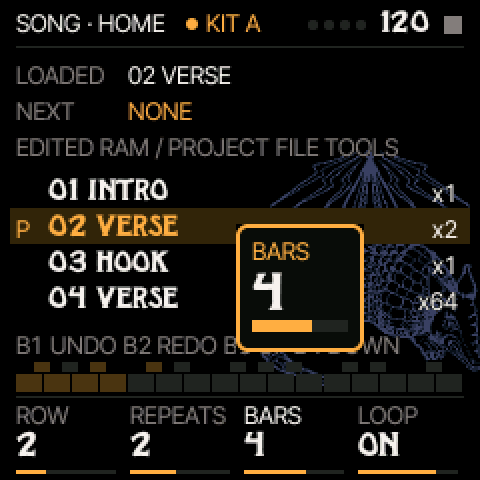
| K1-K4 | ROW, REPEATS (1–64), BARS (the section's length), LOOP. |
| EDIT | LOAD while stopped, CUE while playing: NEXT SECTION QUEUED, then SECTION APPLIED. |
| PLAY | Start and stop the song. |
| REC | A tap records a take into the selected row (chapter 10.4); held, it shows the REC help. |
| HOME | From ADD back to SONG; from SONG to the selected instrument. GLO also leaves. |
Play pads and notes live, record takes into the playing pattern, and undo what you do not keep.
Takes are quantised to the pattern's own grid, swung or straight.
pads
Press ARP. Keys 1–11 are the pads; hold REC as you hit for an accent.
cuts
B1–B4 mute drum groups, B8–B11 kill whole players.
sections
B6 B7 step through the song's sections; the change lands on the bar.
1arm
On PLAY or STEPS with KIT A or KIT B selected, press REC + SEQ. If stopped, BB1 starts playing.
2count in
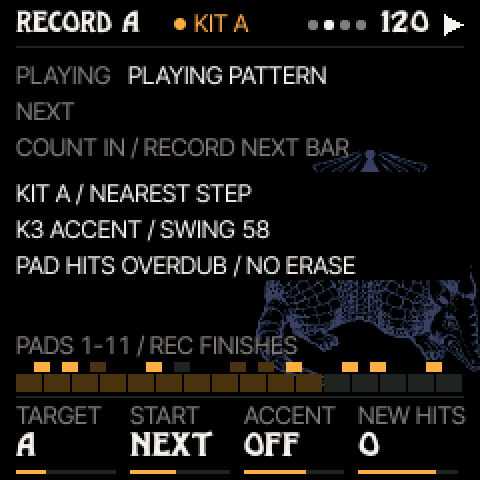
It counts in to the next bar: COUNT IN / RECORD NEXT BAR.
3play the pads
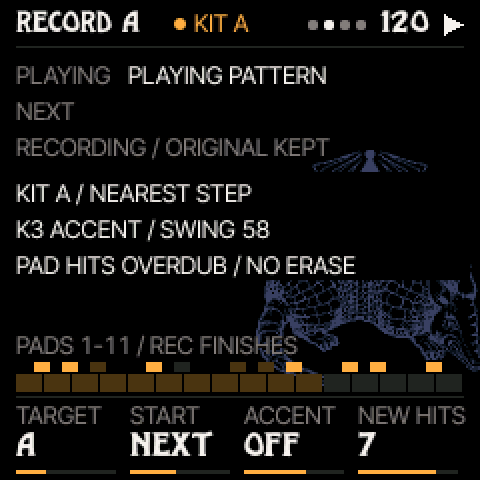
Hit pads 1–11. Hits land on the nearest step and add to the pattern; nothing is erased.
4finish
Press REC to finish. The music keeps playing.
5keep or discard
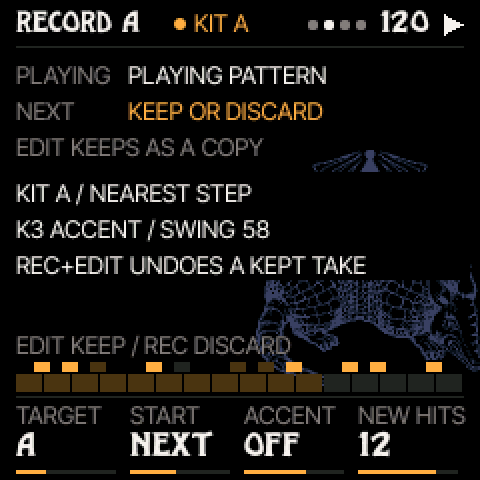
EDIT keeps the take as a copy: TAKE QUEUED · NEXT LOOP, then TAKE APPLIED · REC+EDIT UNDO. REC discards it.
6undo
REC + EDIT undoes a kept take.
record with swing

Swing can stay on while you record. Hits are placed on the swung grid of the pattern as it plays.
The record page shows the swing the take uses, for example K3 ACCENT / SWING 58; half steps show as .5.
accent
K3 turns ACCENT on for every hit of the take.
set up
On SONG, REC opens the setup: K1 TARGET A or B, K2 START NOW or NEXT, K3 ACCENT, K4 LAYER on.
go
REC starts, HOME cancels. EDIT keeps the take in the row; REC discards it.
a take
A pattern holds up to 128 hits: 128 HITS FULL / TAKE REFUSED.
Pads a kit does not have are refused: PAD NOT IN THIS KIT.
Undo keeps the last eight edits and takes.
The tools behind the pages: the Rhythm Conductor, songs, generators, ratchets, your own kits, drum choices, scenes, tempo and swing.
RHYTHM CONDUCTOR is a top-level instrument: one key moves KIT A, KIT B and Dillo to a section together, on the bar (9.1).
1play a song
On the song list pick a song and press PLAY. KIT A, KIT B and Dillo get its initial section in one go. It starts when stopped. While playing, ALL NEXT names the queued song and the player rows and section keys stay on the current song until the bar.
2cue
Press a white key. Its button pulses; on the next bar the coordinated band moves and the button lights up.
3change it
Another key before the bar replaces it; the same key again cancels; PLAY to stop cancels.
what it never touches
A cue moves patterns only. Mutes, levels, kits, sounds and effects stay as they are; a muted player still follows, so it comes back in the right place.
Stopped, a cue applies at once and PLAY starts on it.
one player alone
Turn K4 SCOPE to KIT A, KIT B or DILLO, then hold REC and press a white section key. While you hold REC, the footer names the only player the section key will cue. Release REC and the next plain section press cues all three.
combine rhythms
On RHYTHM CONDUCTOR, press two or more section keys together to combine their rhythms. Tap a single section key to return to that section alone.
In the browser, open Combine rhythms below Current parts. Add two to four rhythms from the current bank and press Queue mix. Dillo follows the lowest-numbered section.
To adjust a combination, keep a section key held after the initial press, tap other section keys to add or remove them, then release all keys. The last section cannot be removed this way.
COMBO marks each drum kit that is still playing the mix. Its component keys stay lit after a single-player redirect or a step edit. An asterisk identifies an edited kit. Dillo plays the lead section of the combination.
The status line names the queued combination and keeps its members visible after it starts, even when you change pages. If the names are too long, it shows each section number.
While a combination is queued, pressing the same combination again cancels it. A different combination replaces it. If the cue misses the bar while transport is running, Conductor retries the whole combination once unless you cancel it.
build a song
A song is a list of rows; each row plays a section a number of times. Up to 64 rows and 32 sections.
lengths in bars
BARS shows a section's length in bars: 4, 1.5, or steps such as 17S when it is not on a beat.
wander
Turn EVOLVE on with REC + LFO. Every EVERY phrases it changes up to AMOUNT of the parts you chose.
home
EDIT captures what plays as home; B2 RETURN goes back to it; B1 FREEZE holds still.
lock
REC + a white key locks that step.
euclid

On EVOLVE, LFO or B3 steps EVOLVE, EUCLID and RANDOM. EUCLID spreads HITS evenly over STEPS, turned by ROTATE, with ACCENTS.
On drums the white keys choose the voice it writes.
random

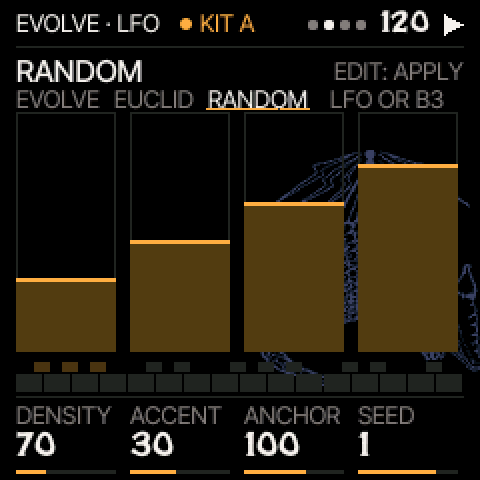
RANDOM writes a pattern from DENSITY, ACCENT, ANCHOR (SLIDE on Dillo) and SEED, 1 to 9999.
apply
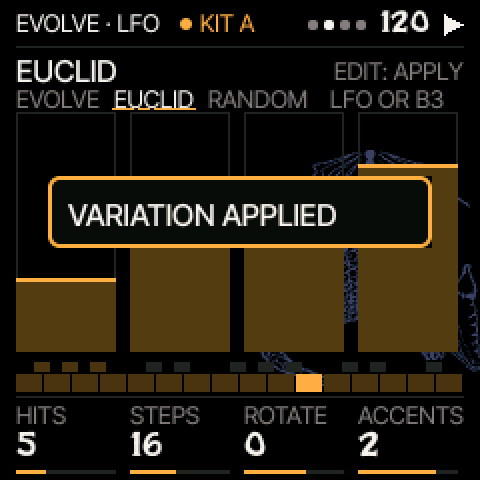
The grey line reads EDIT: APPLY. EDIT applies it on the loop: VARIATION QUEUED / B2 RETURN, then VARIATION APPLIED. B2 returns home.
move one hit
On STEPS, hold an occupied drum step and turn K2. NUDGE moves the whole hit, including its ratchet, from −8/16 early to +7/16 late. Empty steps are refused.
release and undo
The value stays private while you turn. Release the step to queue one edit; NUDGE APPLIED / REC+EDIT UNDO confirms it. REC + EDIT restores the previous timing.
ratchet
Hold a drum step and turn K4: the step plays 1 to 4 times. Let go without turning and the key just toggles the step. The ticks show the count.
BUILD makes a USER kit for KIT A from the voices of the installed machines: each of 17 lanes takes its sound from any kit.
1build
Select KIT A, open KIT and press B1: KIT BUILD.
2pick a lane
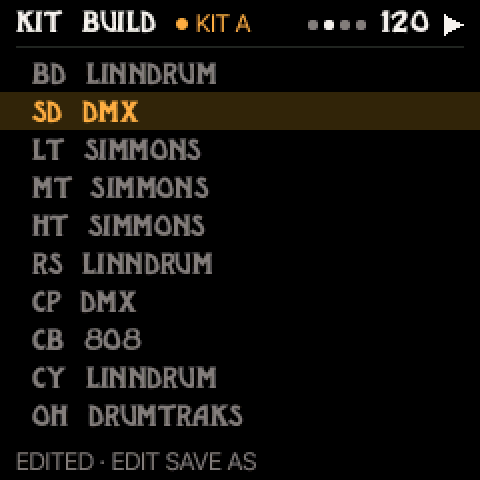
Keys 1–11 and B2–B7 choose a lane and play it.
3shape it
PRESETS chooses the lane's kit; K1–K4 LEVEL, TUNE, DECAY, VOICE.
4save as
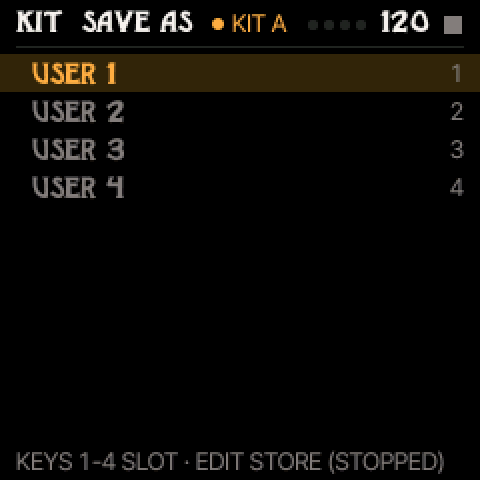
EDIT opens SAVE AS; keys 1–4 choose USER 1–4.
5store
Stop, then EDIT: STORING USER KIT, then USER KIT STORED.
6play it
USER 1–4 sit at the end of KIT A's list; load one like any kit. HOME steps back: SAVE AS, BUILD, the list.
good to know
USER kits play on KIT A. A lane whose kit is not installed plays the 808: KIT NOT INSTALLED · 808 STANDS IN.
Scenes keep KIT A's USER kit with them.
choose a machine
Each drum list offers 808 and the seven sampled machines. The status strip says MACHINES; on KIT A it changes to USER KITS when the cursor reaches USER 1–4.
store
Stop, press SAVE, choose a scene with 1–4 and press EDIT: SAVED / FLASH VERIFIED.
REC + SAVE stores to the current scene from any page.
load
On SAVE, stopped, REC + key 1–4 loads that scene: LOADED / PRESS PLAY.
other data
A scene holding another firmware's data reads SCENE 4 HAS OTHER DATA and is never loaded. To replace it, hold SAVE for two seconds on that scene.
the band clock
A queued song keeps the playing tempo and swing until the bar, then brings in its own clock with all three parts. Replacing a single drum pattern in Big Beat keeps the band’s current tempo and swing.
tempo
REC + SELECT turns the tempo; REC + GLO taps it; GLOBAL K1 sets 30 to 300 BPM.
swing
On drums SCL switches swing on and off; GLOBAL K2 sets it from 50 to 75 %.
Short recipes for things people ask.
Each takes a minute.
play two machines at once
- Tap HOME and turn SELECT to BIG BEAT.
- Press B5 marked A/B to select KIT B. Hold REC and press ARP to switch that layer on.
- Turn PRESETS, choose a machine, press EDIT; choose a pattern with ALGO, then EDIT. KIT A remains unchanged and both layers play on the bar.
make a kit from three machines
- Select KIT A, turn PRESETS, press B1.
- Press 1, turn PRESETS to LinnDrum. Press 2, choose DMX. Press 3, choose Simmons.
- Press EDIT, key 1, stop, EDIT.
record a swung take
- Press SCL: SWING ON.
- Press ARP, then REC + SEQ.
- Play pads 1–11, press REC, then EDIT to keep.
make a four-row song
- Press GLO, then white key 4 for SONG.
- Press 1, choose a part with K3, press EDIT. Repeat three times.
- Press PLAY.
euclidean hats
- Press LFO until the title reads EUCLID.
- Press 11 for CLOSED HAT; set HITS and STEPS with K1 K2.
- Press EDIT.
follow another clock
- Press GLO, then 2 for MIDI CLOCK.
- Set CLOCK IN with K1 and FOLLOW ON with K2.
- Stop, press EDIT to keep the setting.
send clock to a computer
- On MIDI CLOCK, stopped, turn K4 to USB ON.
- BB1 now ignores clock coming in on USB.
- Press EDIT to keep it.
play dillo from a keyboard
- Set your keyboard to channel 1.
- Play: notes, pitch bend and sustain go to Dillo.
- CC74 is cutoff, CC71 resonance.
start again
- Hold REC and press HOME: all notes off.
- Press PLAY to stop.
- Load a scene with SAVE, then REC + 1.
drop the band into the break
- On the song list, press PLAY.
- On RHYTHM CONDUCTOR, press the white key of the break: its button pulses.
- On the bar, all three players jump together.
try dillo's sounds while playing
- Tap HOME, turn SELECT to DILLO, then hold a note.
- Turn PRESETS: each sound arrives as you stop.
- EDIT keeps it; HOME puts the old one back.
find out what a key does
- Hold HOME.
- Press the key: its row lights and the bottom line explains it.
- Let go of HOME.
MIDI, messages, troubleshooting and recovery.
For installing and going back, the installer page is the authority.
midi channels

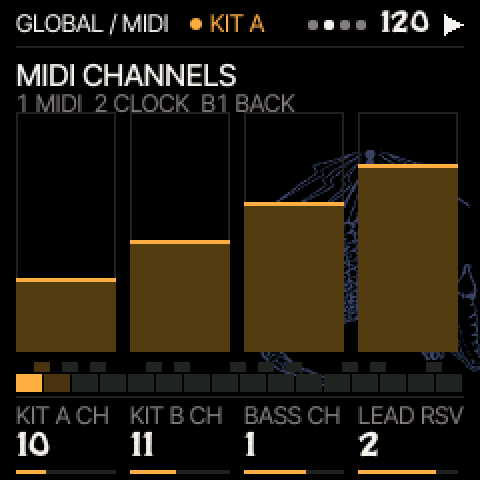
GLO, then 1. K1–K3 set KIT A, KIT B and Dillo (BASS CH): 1–16 or OFF; two parts never share a channel. LEAD RSV is reserved.
Stop, then EDIT or SAVE keeps the settings: GLOBAL SETTINGS SAVED. B1 or HOME goes back to GLOBAL; hold HOME for help here too.
midi clock

2 opens MIDI CLOCK: K1 CLOCK IN (USB or TRS), K2 FOLLOW, K3 TRANSPORT, K4 CLOCK OUT.
Defaults: USB, FOLLOW ON, TRANSPORT ON, CLOCK OUT OFF.
| implementation | |
|---|---|
| notes | KIT A on channel 10 and KIT B on 11 (drum notes below, with velocity); Dillo on channel 1. |
| controllers | Dillo: CC7 level, CC74 cutoff, CC71 resonance, CC64 sustain, CC120 all sound off, CC121 reset, CC123 all notes off; pitch bend. |
| program change | Programs 0–8 on Dillo's channel load its nine sounds. |
| clock | Start plays from the top, Continue resumes, Stop stops (TRANSPORT ON). FOLLOW takes the tempo, to the nearest whole BPM, 30–300; it follows tempo, not phase. |
| clock out | USB only, off unless you turn it on; while it is on, clock coming in on USB is ignored. |
| not used | Song position, thru and bank remapping. |
| note | plays |
|---|---|
| 36 | kick |
| 38 | snare |
| 45 | low tom |
| 47 | mid tom |
| 50 | high tom |
| 37 | rim |
| 39 | clap |
| 56 | cowbell |
| 49 | cymbal |
| 46 | open hat |
| 42 | closed hat |
| you see | it means |
|---|---|
| NEXT / QUEUED | Your change waits for the bar. |
| APPLIED | The music has it. |
| BUSY / SELECT AGAIN | It was mid-change: press again. |
| STOP FIRST | Saving, loading and storing need the music stopped. |
| KIT WAITING / EDIT: RETRY | A queued kit has not started after a while: press EDIT to try again. |
| NO PATTERNS FOR THIS KIT | That kit cannot play the highlighted pattern. |
| LAYER OFF | This player is switched off: REC + ARP. |
| CUE REFUSED: B NEEDS VOICES | A section could not play on the player named (A, B or DILLO), so nothing moved. Other causes: NEEDS A RICH KIT, NEEDS TIMING, NO DRUMS HERE, NO LINE HERE. |
| TOO LATE TO CANCEL | The bar came before your cancel could land, so the section plays. |
| BUSY - RETRY | There was no room to send it yet; nothing changed. Try again. |
| MISSED THE BAR / CUE CANCELLED | The cue was not ready in time, or you cancelled it; the music carries on. |
| CANCELLED BY STOP | Stopping ended a queued change. |
| SONG PLAYING | The SONG arranger is in charge; the section keys wait. |
| SOUND RESTORED / SOUND KEPT | Dillo's sound put back by HOME, or kept by EDIT. |
| NOT IN THIS BUILD | That combination has no job in this firmware. |
| HELP UNAVAILABLE | The help texts are missing: reinstall from the installer page. |
| SCENE n HAS OTHER DATA | That scene belongs to another firmware (chapter 11.8). |
| AUDIO FAULT / LOAD BLOCKED | The change was refused so the music keeps playing. |
| OCTAVE LIMIT / TRANSPOSE LIMIT | As far as it goes. |
no sound
PLAY and STEPS name the cause and recovery in the top strip: MASTER level, OFF layer, MUTED part, another solo, or instrument level. On RHYTHM CONDUCTOR, a half-lit key B1–B3 marks a player you cannot hear. The row distinguishes CUT (muted) from OFF (disabled).
If the strip names a soloed player, go to RHYTHM CONDUCTOR. Hold REC and press the same black key again to clear the solo: B1 for KIT A, B2 for KIT B or B3 for Dillo.
REC + HOME stops stuck notes.
nothing changes
Changes land on the bar: a pulsing key is waiting. If KIT WAITING / EDIT: RETRY shows, press EDIT. An off key does nothing on this page.
where am i?
Hold HOME for help, and press a key while holding it to hear what it does; tap HOME to go back.
fm-1 not found
Try another USB cable (some only charge), plug straight into the computer, and close other apps that use MIDI.
stopped halfway
Allow MIDI access including SysEx, close other MIDI apps and use a direct cable. If the MIDI update loader is then visible, retry the same button.
will not start
A blank screen or ROM mode is not the MIDI loader: stop retrying in the browser. The installer page links a hardware-assisted recovery route.
What BB1 does, in numbers, from its own source.
| instruments | RHYTHM CONDUCTOR, BIG BEAT and DILLO. The Conductor coordinates two drum layers (KIT A, KIT B) and Dillo; BIG BEAT contains the two drum layers; Dillo is a monophonic bass synth. |
| drum voices | 11 pads per kit; 17 voices to write on STEPS. |
| kits | 808, 7 sampled machines, 4 USER kits (KIT A). |
| dillo | 9 sounds; square or saw; scales OFF, MINOR, MAJOR, DORIAN, PENTA; keys ±2 octaves. |
| patterns | Up to 64 steps in four 16-step banks; ratchets x1–x4 and per-hit nudge from −8/16 to +7/16 of one step. |
| library | SONGS: 67 named songs (233 parts). PRESETS: 4 Roland rhythm machines (138 rhythms). ERAS: 21 eras, 168 parts. ACID: 27 banks, 205 phrases. |
| sections | RHYTHM CONDUCTOR: up to 64 sections on white keys, four pages of 16. PATTERN: up to 55 on black keys, five pages of 11. |
| dillo sounds live | A new sound loads 350 ms after PRESETS stops turning. |
| lights | Four states on every key and button: off, half-lit, bright, pulse. |
| song | 64 rows, 32 sections, 16 arrangement undo steps; repeats 1–64. |
| recording | Up to 128 hits per pattern; eight-step Undo. |
| tempo, swing | 30–300 BPM; swing 50–75 % in half steps. |
| effects | Tape echo (three heads, tape drive, motion) and spring; per-player sends. |
| scenes | 4 scenes, saved stopped and read back. |
| midi | USB and TRS in; USB clock out; channels 1–16. |
| screen | 240 × 240 colour display. |
Everything BB1 can play, as its own lists name it.
The sound library is installed with the firmware as a matched pair (chapter 3.3).
808 and sampled
808 is synthesised voice by voice; LinnDrum, DrumTraks, DMX, Linn LM-1, Simmons, Rhythm King and Drumulator are sampled.
| machine | asks for | plays |
|---|---|---|
| 808 | ride | cymbal |
| 808 on KIT B | synth percussion, zap | cowbell, high tom |
| LinnDrum | middle conga · claves · shaker | middle tom · rimshot · maracas |
| DrumTraks | low, high tom · congas · claves · shaker | middle tom · middle tom · rimshot · maracas |
| DMX | congas · claves · cowbell · shaker | toms · rimshot · rimshot · maracas |
| Linn LM-1 | congas · claves · ride · shaker | toms · rimshot · cymbal · maracas |
| Simmons | congas · claves · clap · maracas · cowbell · cymbal · ride · shaker | toms · rimshot · snare · closed hat · rimshot · open hat · open hat · closed hat |
| Rhythm King | middle tom · low, middle conga · high conga · clap · ride · shaker | low tom · low tom · high tom · snare · cymbal · maracas |
| Drumulator | middle, high conga · maracas · shaker | middle, high tom · closed hat · closed hat |
USER 1–4
Build your own kits for KIT A (chapter 11.6).
nine sounds
- Silver Pulse
- Liquid Wire
- Dry Jack
- Open Circuit
- Rubber Acid
- Long Fuse
- Hot Valve
- Hollow Dub
- Square Acid
Square Acid suits the ACID phrases.
21 eras · 168 parts
- Motorik Electronics
- Late-70s Machine Pop
- New Romantic
- Futurist Pop
- Synth Pop
- Electro Boogie
- Hi-NRG
- Industrial Pop
- Acid House
- Hip-Hop
- Chicago House
- Balearic Afterhours
- Detroit Techno
- Rave Techno
- Boom Bap
- Trip-Hop
- Big Beat
- UK Garage
- New York Electro
- West Coast Electro
- Boogie Funk
67 named songs · 233 parts
- Planet Rock
- Blue Monday
- Sexual Healing
- In the Air Tonight
- Voodoo Ray
- Paul Revere
- Clear
- Egypt, Egypt
- It's Yours
- Posse On Broadway
- Bassline
- Tainted Love
- Behind the Mask
- Numbers
- The Robots
- Computer Love
- The Model
- Trans-Europe Express
- Radioactivity
- 777-9311
- True Faith
- Pacific State (Original Extended Version)
- Problèmes D'Amour
- Flim
- Heliosphan
- minipops 67
- Take My Breath Away
- The Purdie Shuffle
- Word Up
- Around the World
- One More Time
- Revolution 909
- You Spin Me Round
- Enjoy the Silence
- Just Can't Get Enough
- Personal Jesus
- Big Mess
- Sweet Dreams
- Clint Eastwood
- Dirty Harry
- I Can't Go For That (No Can Do)
- Need You Tonight
- Funky Drummer
- Oxygène (Part IV)
- The Bells
- Voodoo Child
- Autobahn
- When The Levee Breaks
- LFO
- Going Back to Cali
- Borders
- Vogue
- In Full Effect
- Teardrop
- Closer
- B.O.B. (Bombs over Baghdad)
- Acid Tracks
- When Doves Cry
- Kid A
- Ghostbusters
- Never Gonna Give You Up
- P.S.K. What Does It Mean
- Dig It
- Everybody Wants To Rule The World
- Pump Up The Jam
- I Wanna Dance With Somebody
- 1000 Knives
4 machines · 138 rhythms
- Roland CR-8000 · 43
- Roland CR-78 · 11
- Roland TR-66 · 54
- Roland TR-77 · 30
The PRESETS tab lists all 138 rhythms. Use ALGO to scroll or OCT+ to move a page at a time. After loading a rhythm, OCT+ on RHYTHM CONDUCTOR pages through that machine’s rhythms (9.1).
27 banks · 205 phrases
- Alamo
- San Jacinto
- Austin
- San Antonio
- El Paso
- Rio Grande
- Brazos
- Colorado
- Davis Mtns
- Chisos
- Bluebonnet
- Live Oak
- Mesquite
- Longhorn
- Roadrunner
- Armadillo
- Washington
- Big Spring
- Lufkin
- San Gabriel
- Guadalupe Pk
- Sunflower
- Cedar
- Whitetail
- Monarch
- Alligator
- Jaguar
Many phrases are adapted from transcriptions at Acid-Tabs.com by J. McConaghy, used under CC BY-SA 4.0; those adapted phrases are shared under the same licence.
the matching library
The installer puts the sound library that pairs with this firmware on with it. It carries the sampled machines and the help texts; the firmware checks the help texts are the ones it was built with.
With another library, help reads HELP UNAVAILABLE and the controls still work.
Every topic, A to Z, with its section number.
Section numbers match the headings exactly.