MIDI, messages, troubleshooting and recovery.
For installing and going back, the installer page is the authority.
midi channels

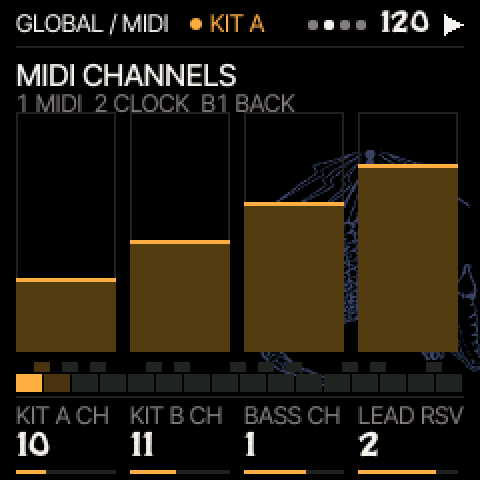
GLO, then 1. K1–K3 set KIT A, KIT B and Dillo (BASS CH): 1–16 or OFF; two parts never share a channel. LEAD RSV is reserved.
Stop, then EDIT or SAVE keeps the settings: GLOBAL SETTINGS SAVED. B1 or HOME goes back to GLOBAL; hold HOME for help here too.
midi clock

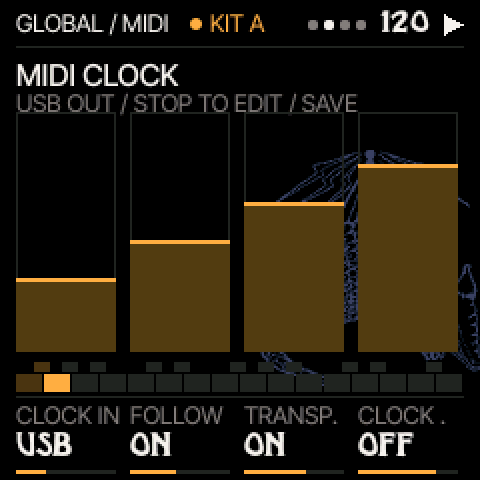
2 opens MIDI CLOCK: K1 CLOCK IN (USB or TRS), K2 FOLLOW, K3 TRANSPORT, K4 CLOCK OUT.
Defaults: USB, FOLLOW ON, TRANSPORT ON, CLOCK OUT OFF.
| implementation | |
|---|---|
| notes | KIT A on channel 10 and KIT B on 11 (drum notes below, with velocity); Dillo on channel 1. |
| controllers | Dillo: CC7 level, CC74 cutoff, CC71 resonance, CC64 sustain, CC120 all sound off, CC121 reset, CC123 all notes off; pitch bend. |
| program change | Programs 0–8 on Dillo's channel load its nine sounds. |
| clock | Start plays from the top, Continue resumes, Stop stops (TRANSPORT ON). FOLLOW takes the tempo, to the nearest whole BPM, 30–300; it follows tempo, not phase. |
| clock out | USB only, off unless you turn it on; while it is on, clock coming in on USB is ignored. |
| not used | Song position, thru and bank remapping. |
| note | plays |
|---|---|
| 36 | kick |
| 38 | snare |
| 45 | low tom |
| 47 | mid tom |
| 50 | high tom |
| 37 | rim |
| 39 | clap |
| 56 | cowbell |
| 49 | cymbal |
| 46 | open hat |
| 42 | closed hat |
| you see | it means |
|---|---|
| NEXT / QUEUED | Your change waits for the bar. |
| APPLIED | The music has it. |
| BUSY / SELECT AGAIN | It was mid-change: press again. |
| STOP FIRST | Saving, loading and storing need the music stopped. |
| KIT WAITING / EDIT: RETRY | A queued kit has not started after a while: press EDIT to try again. |
| NO PATTERNS FOR THIS KIT | That kit cannot play the highlighted pattern. |
| LAYER OFF | This player is switched off: REC + ARP. |
| CUE REFUSED: B NEEDS VOICES | A section could not play on the player named (A, B or DILLO), so nothing moved. Other causes: NEEDS A RICH KIT, NEEDS TIMING, NO DRUMS HERE, NO LINE HERE. |
| TOO LATE TO CANCEL | The bar came before your cancel could land, so the section plays. |
| BUSY - RETRY | There was no room to send it yet; nothing changed. Try again. |
| MISSED THE BAR / CUE CANCELLED | The cue was not ready in time, or you cancelled it; the music carries on. |
| CANCELLED BY STOP | Stopping ended a queued change. |
| SONG PLAYING | The SONG arranger is in charge; the section keys wait. |
| SOUND RESTORED / SOUND KEPT | Dillo's sound put back by HOME, or kept by EDIT. |
| NOT IN THIS BUILD | That combination has no job in this firmware. |
| HELP UNAVAILABLE | The help texts are missing: reinstall from the installer page. |
| SCENE n HAS OTHER DATA | That scene belongs to another firmware (chapter 11.8). |
| AUDIO FAULT / LOAD BLOCKED | The change was refused so the music keeps playing. |
| OCTAVE LIMIT / TRANSPOSE LIMIT | As far as it goes. |
no sound
PLAY and STEPS name the cause and recovery in the top strip: MASTER level, OFF layer, MUTED part, another solo, or instrument level. On RHYTHM CONDUCTOR, a half-lit key B1–B3 marks a player you cannot hear. The row distinguishes CUT (muted) from OFF (disabled).
If the strip names a soloed player, go to RHYTHM CONDUCTOR. Hold REC and press the same black key again to clear the solo: B1 for KIT A, B2 for KIT B or B3 for Dillo.
REC + HOME stops stuck notes.
nothing changes
Changes land on the bar: a pulsing key is waiting. If KIT WAITING / EDIT: RETRY shows, press EDIT. An off key does nothing on this page.
where am i?
Hold HOME for help, and press a key while holding it to hear what it does; tap HOME to go back.
fm-1 not found
Try another USB cable (some only charge), plug straight into the computer, and close other apps that use MIDI.
stopped halfway
Allow MIDI access including SysEx, close other MIDI apps and use a direct cable. If the MIDI update loader is then visible, retry the same button.
will not start
A blank screen or ROM mode is not the MIDI loader: stop retrying in the browser. The installer page links a hardware-assisted recovery route.