Compás 1.2 / The guide

Know the band.

Nine pages, seven knobs and a row of buttons. This is what each one does, page by page, in the order you meet them.

The buttons

The same row on every page. A few change their job with the page you are on.

  • fxmix / effects / loop
  • sclaccent
  • envbass
  • lfoperc
  • editsteps / assign
  • glosongs
  • homeband
  • saveon Songs / Kumbia
  • arpfill / roll / hold
  • seqending / steps / cue
  • playstart / stop
  • rec727 / record
  • oct−varies by page
  • oct+varies by page

Press home

band

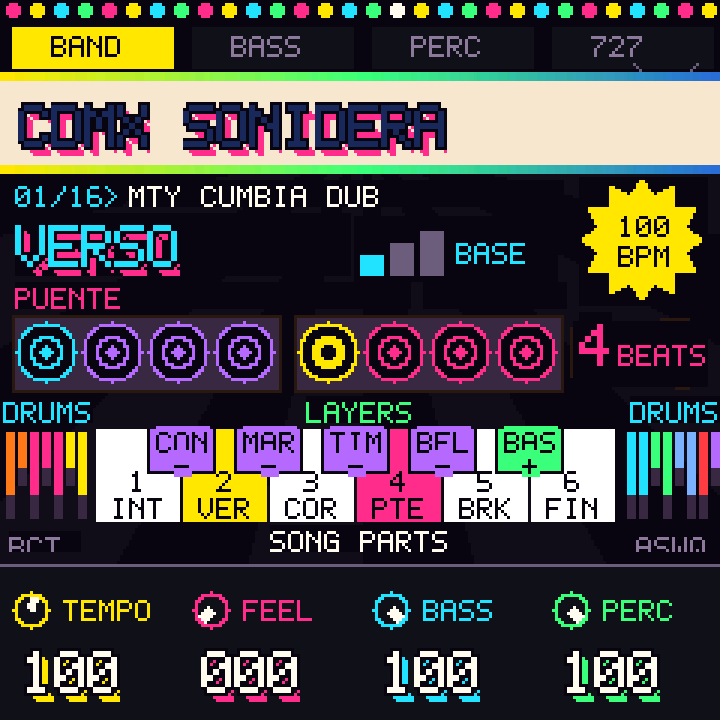
The band overview for groove studies. Cue a part with the centre white keys; live part and energy cues normally wait for a phrase boundary. Double-tap a waiting part within 400 ms to cue it at the next bar. Knob changes such as tempo and levels do not all wait for the phrase.

Knobs

ControlWhat it does
selectPage: band → bass → perc → 727 → kumbia
algorithmEnergy: base, lift, break (grooves only)
k1Tempo, 60–180 bpm before rebajada
k2Feel: timing, hit-strength and note-length variation
k3Bass level, when the groove has a separate bass
k4Adjust all four percussion overlay levels together
presetsBrowse populated songs in either direction; loading replaces unsaved working changes

Keys and buttons

ControlWhat it does
six centre white keys (C4–A4)Cue parts 1–6 in order; names follow the groove
five centre black keysToggle conga, maraca, timbal and campana overlays; the fifth toggles bass mute if a bass is available
outer keysPlay 727 sounds over the band
arpQueue a fill (grooves); hold/release a playing written score
seqCue the ending; a groove finishes its ending phrase and stops
sclToggle accent for manual 727 hits
masterRaise or lower the overall volume; MASTER is separate from the seven encoders shown above

Written scores use different controls: K1 tempo, K2 guide where available, K3 hold/release while playing, K4 transpose −6 to +5 semitones. Score transposition lands at the next written bar while playing.

Press fx

mix

Choose a channel, set its level, and mute or solo it. SPEED makes a rebajada by slowing playback and lowering pitch together.

Knobs

ControlWhat it does
selectChoose a channel
algorithmEnergy: base, lift, break (grooves only)
k1Tempo before rebajada
k2Feel: timing, hit-strength and note-length variation
k3Chosen channel level (grooves only)
k4Speed, 60–100%; tempo and pitch move together
presetsBrowse populated songs in either direction; loading replaces unsaved working changes

Keys and buttons

ControlWhat it does
keys 1–6Toggle channel mutes (grooves only)
keys 7–12Toggle channel solos (grooves only)
fx againOpen effects

The BPM readout and transmitted MIDI clock follow the effective tempo, including rebajada. On written scores, FEEL, channel levels and mute/solo are inactive here. SPEED resets to 100% on restart.

Press edit

steps

Edit a groove channel on a sixteenth-note grid. Each displayed bar has sixteen steps in 4/4 or eight in 2/4. This is the band editor; the 727 has its own step view.

Knobs

ControlWhat it does
selectChoose a channel
algorithmEnergy: base, lift, break (grooves only)
k1Tempo
k2Feel: timing, hit-strength and note-length variation
k3Chosen channel level
presetsBrowse populated songs in either direction; loading replaces unsaved working changes

Keys and buttons

ControlWhat it does
keys 1–16 (4/4) / 1–8 (2/4)Toggle steps in the selected bar
oct− / oct+Select bar 1 / bar 2
seqCycle base, lift and break energy

Edits last for the session unless captured in a supported saved show. EDIT returns to Band for written scores.

Press rec

727

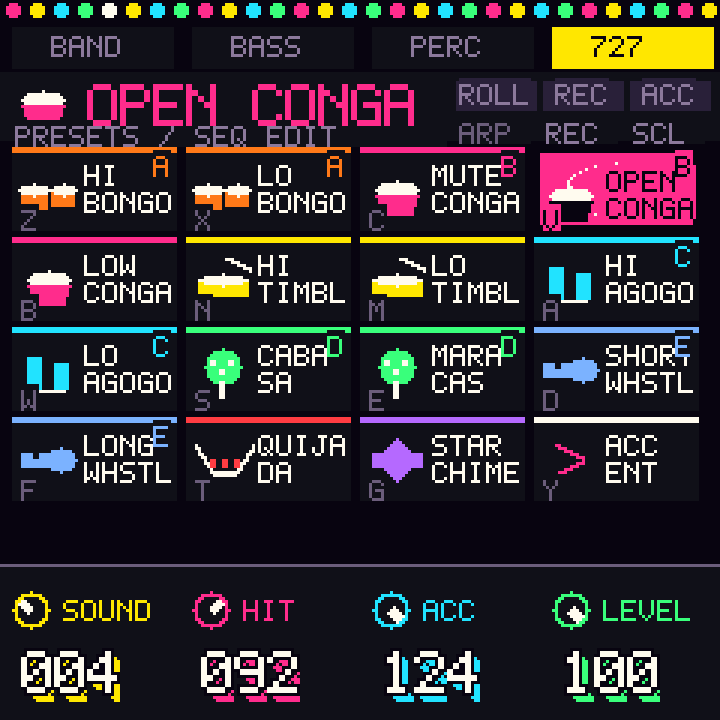
Fifteen sampled 727 percussion sounds, one per pad key: bongó, conga, timbal, agogó, cabasa, maracas, quijada and more. The controls below describe pad mode. SEQ opens a separate step view.

Knobs

ControlWhat it does
selectPage: band → bass → perc → 727 → kumbia
algorithmRoll subdivision while ROLL is on; energy otherwise
k1Choose the sound to record or edit
k2Hit strength
k3Accent strength
k4727 level
presetsBrowse 29 complete groove studies

Keys and buttons

ControlWhat it does
keys 1–15Play the fifteen sounds
key 16 / sclToggle accent
arpToggle roll; hold a pad key to repeat its sound
recRecord the selected sound into the loop; press again to stop recording (grooves only)
seqSwitch between pads and the 727 step grid
fxCycle loop off → layer with band → drums only (grooves only)
editWhile stopped, assign the selected sound to a compatible channel chosen on Mix
oct−While stopped, restore automatic sound assignment for that channel

In the 727 step view, K1 chooses sound, K2 tempo, K3 hit strength, K4 level; keys toggle steps and SCL sets the step accent mode. OCT−/+ selects steps 1–16 / 17–32 in 4/4; 2/4 uses sixteen steps total. PRESETS browses 22 percussion parts. Written scores must switch to a groove for step editing.
Press glo

songs

Sixteen set-list slots, one per key. Select a destination separately from cueing a song. A live groove-song cue waits for the phrase boundary; written scores change at a written-bar boundary.

Knobs

ControlWhat it does
selectChoose the destination slot without cueing it
algorithmScreen language: English / Spanish
k1Tempo
k2Repeat, 0–64 phrases; 0 holds the groove (grooves only)
k3Choose the destination slot without cueing it
k4Count-in on/off, while stopped (grooves only)
presetsBrowse populated songs in either direction; loading replaces unsaved working changes

Keys and buttons

ControlWhat it does
keys 1–16Cue the song in that slot, if populated
saveWhile stopped, capture the current song and settings into the selected slot
seqCue the selected slot; during a written score, cue its ending
oct− / oct+Select the previous / next destination slot without cueing it
playStart / stop playback

ALGORITHM changes the device language here. SAVE lasts for the current session and resets at power-off.

Press env

bass

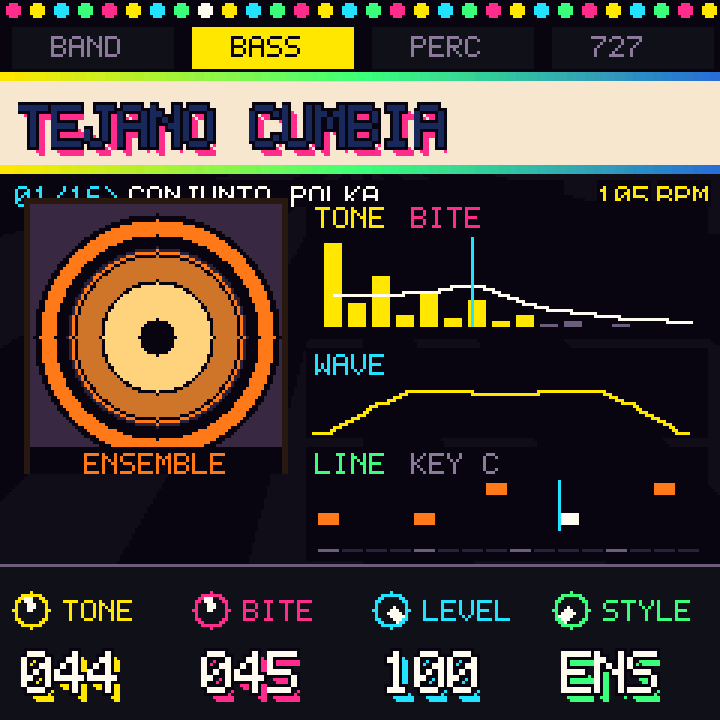
Shape the separate bass voice where the groove has one. These controls are inactive for percussion-only grooves and written-score accompaniment.

Knobs

ControlWhat it does
selectPage: band → bass → perc → 727 → kumbia
algorithmEnergy: base, lift, break (grooves only)
k1Tone: darker / brighter
k2Bite: attack character
k3Bass level
k4Style: ensemble / acid
presetsBrowse populated songs in either direction; loading replaces unsaved working changes

Keys and buttons

ControlWhat it does
oct− / oct+Move the groove root down / up one semitone, within C–B; immediate while stopped, phrase-boundary while playing
six centre white keysCue parts, as on Band

Cumbia Costa, Cumbia Banqueña, Barranquilla and Cumbia Soledad have no separate bass. Use Band K4 to transpose a written score.

Press lfo

perc

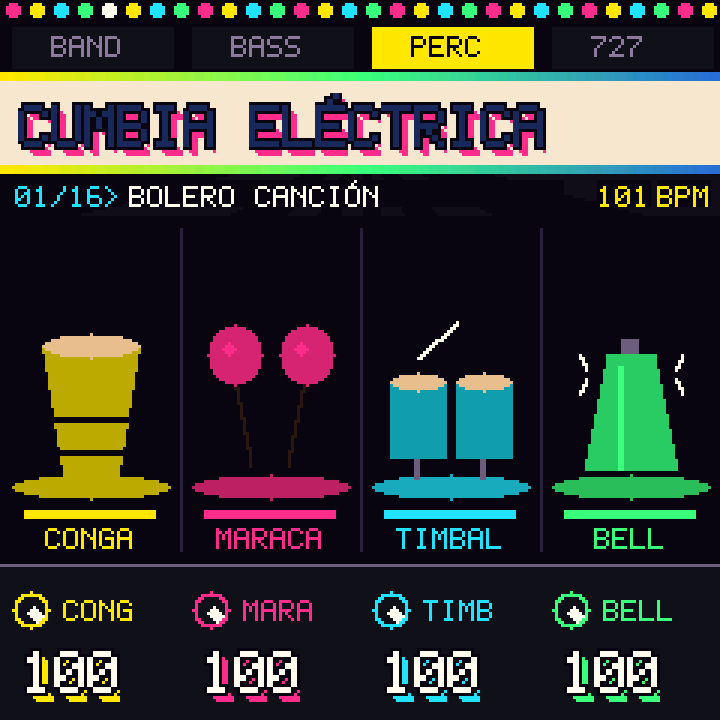
Four percussion overlays: conga, maraca, timbal and campana. They sit over the groove. Salsa Son and Son Montuno also provide a 3–2 / 2–3 son-clave switch.

Knobs

ControlWhat it does
selectPage: band → bass → perc → 727 → kumbia
algorithmEnergy: base, lift, break (grooves only)
k1Conga overlay level
k2Maraca overlay level
k3Timbal overlay level
k4Campana overlay level
presetsBrowse populated songs in either direction; loading replaces unsaved working changes

Keys and buttons

ControlWhat it does
first four centre black keysToggle the four overlays
oct− / oct+Select 3–2 / 2–3 in Salsa Son or Son Montuno; live changes wait for the phrase

Changing clave aligns the backing. The exact TUMBAO TWO and SON PERC presets follow it; edited 727 grids remain independent. Selecting the current direction cancels a waiting change. These knobs are inactive for written scores; available score percussion is controlled from Band.

Press select

kumbia

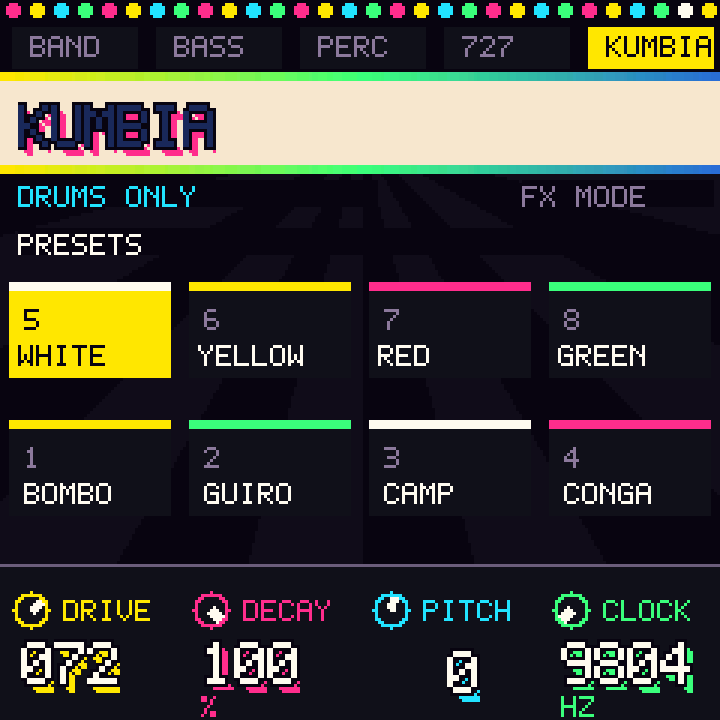
Four sounds and four factory patterns from Oficina de Sonido’s Hanan Cumbia: bombo, güiro, campana and conga. Start from the home settings, then shorten, transpose or saturate the kit.

Knobs

ControlWhat it does
selectPage: band → bass → perc → 727 → kumbia
k1Drive, 0–100: saturation of the kit mix
k2Decay, 5–100%: sample length; 100% retains the full tail
k3Pitch, −12 to +12 semitones, all four sounds
k4Clock, 4400–9804 Hz: lower for rougher sound; pattern tempo stays the same
presetsChoose the pattern

Keys and buttons

ControlWhat it does
keys 1–4Bombo, güiro, campana, conga; hitting the same sound again restarts it
keys 5–8White, yellow, red, green; live changes land at the next four-beat boundary when the kit is active
fxOff → layer with the groove → drums only; not available with written scores
playWhen stopped with the kit off, start the kit alone at 90 bpm; otherwise start/stop at the current mode and tempo

Home: DRIVE 0, DECAY 100%, PITCH 0, CLOCK 9804 Hz. In Layer, backing accents increase the drive input when DRIVE is above zero. Kit settings reset at power-off in Compás.

Press fxNew in 1.2

effects

Stereo room reverb, tempo-synced echo and compression across the mix. Turn ROOM or ECHO up gradually, then adjust TIME, REPEAT and GLUE to suit the song.

Knobs

ControlWhat it does
selectChoose a channel, as on Mix
algorithmEnergy: base, lift, break (grooves only)
k1Room, 0–100: stereo reverb level
k2Echo, 0–100: echo level
k3Time: 1/16, 1/8, 3/16, 1/4, 3/8, 1/2; follows effective tempo
k4Repeat, 0–90: echo feedback; higher values give a longer tail
presetsBrowse populated songs in either direction; loading replaces unsaved working changes

Keys and buttons

ControlWhat it does
oct− / oct+Glue down / up by 10, within 0–100: compression across the mix
keys 1–6 / 7–12Toggle channel mute / solo, as on Mix (grooves only)
fxReturn to Mix

ROOM, ECHO and GLUE start at 0; TIME starts at 3/16 (a dotted eighth) and REPEAT at 35. The echo now retains the displayed TIME division across the supported range of 36–180 effective BPM. With tempo at 60 BPM and REBAJADA at 60 %, the effective tempo is 36 BPM. Effects reset at restart.

Clock, saving and updates

MIDI clock

Compás sends MIDI clock at 24 pulses per quarter note while playing, with Start and Stop. Its outgoing clock follows the band's effective tempo, including REBAJADA. Incoming MIDI Start/Stop control transport; incoming clock-follow is not implemented. Select Compás as the clock source in the receiving application's settings.

Saving

SAVE on the FM-1 keeps a session copy, not a durable flash save. Working edits and effects reset on power-off; browser files remain the way to retain supported shows and rhythms.

After an update

After a firmware transfer, a missing startup reply is not proof that the write failed. Keep USB connected and use Check connection to retry the identity query. This recheck does not reflash. Only an exact identity reply reports success. An interrupted transfer and a completed-but-unverified restart are different states.